
So far, every prompt we’ve written has been a one-off request: you type something, the model responds, done. But there’s a second, quieter kind of instruction that shapes everything the model says across a whole conversation, often without you ever seeing it. It’s called the system prompt, and understanding it helps explain why an assistant behaves the way it does.
This article is about that behind-the-scenes instruction, and about persona design: the craft of using it to give a model a consistent, well-chosen character. Whether you’re building something with a model or just want to get more out of a chat assistant, this is useful to understand.
Two kinds of instruction
There are two layers of instruction at work when you talk to an AI assistant, and they do different jobs. Figure 1 shows both.
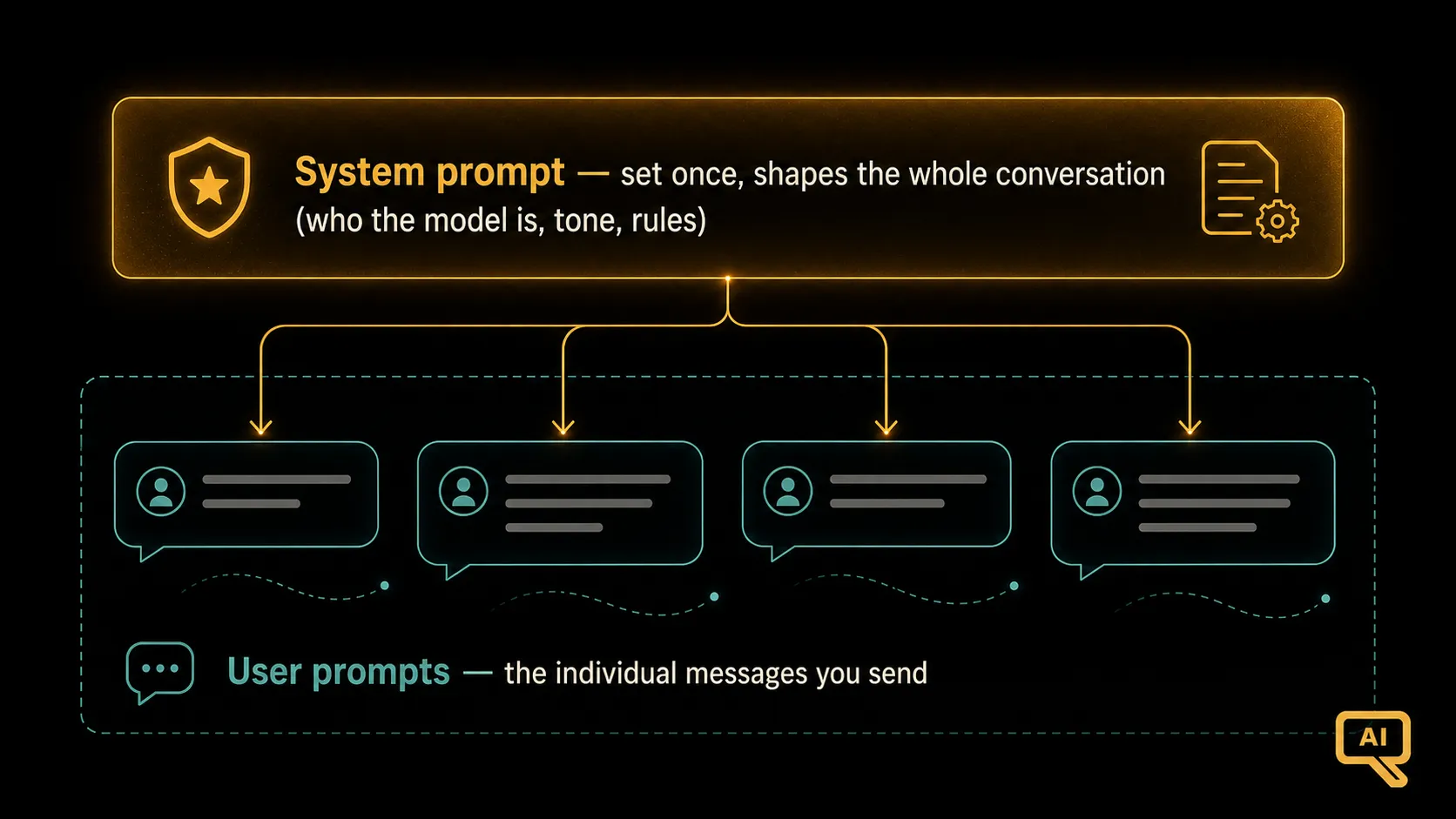 Figure 1: The system prompt is set once, behind the scenes, and shapes the model’s behaviour for the whole conversation. User prompts are the individual messages you send within that conversation.
- The system prompt is set once, usually before the conversation even starts, and it defines the model’s overall behaviour: who it is, how it should act, what tone to take, what rules to follow. It quietly governs the entire conversation.
- User prompts are the individual messages you send: the actual back-and-forth. Each one is a specific request made within the world the system prompt has set up.
The analogy I find clearest is theatre. The system prompt is the director’s brief given to an actor before the curtain rises: “You’re playing a warm, patient teacher. Keep your language simple. Never break character.” The user prompts are the cues during the show: the specific things that come up that the actor responds to, always in character. The director’s brief shapes how every single line is delivered, even though the audience never hears it.
Who writes the system prompt?
This depends on how you’re using the model, and it’s worth knowing:
- In a chat assistant you use day to day, the system prompt is usually written by the company that built the app. It’s why the assistant has a consistent personality and follows certain rules; that behaviour was set in a system prompt you never see.
- When you build something with a model yourself, you write the system prompt. This is where a huge amount of an application’s character and reliability comes from, so it’s worth doing well.
- Increasingly, chat tools let you set your own persistent instructions (sometimes called “custom instructions” or a “persona”), which is really you writing a little system prompt of your own, so the assistant behaves how you like across all your chats.
So even as an everyday user, this isn’t just theory. Knowing about system prompts lets you take control of how your AI assistant behaves.
Persona design: crafting the character
Persona design is simply the craft of writing a good system prompt: deliberately shaping the model’s role, tone, expertise, and boundaries so it behaves consistently and appropriately. A well-designed persona makes the difference between a model that feels purpose-built and one that feels generic.
A strong persona usually specifies a few things:
- A role: who the model is being. “You are a friendly coding tutor for absolute beginners.”
- A tone and style: how it should sound. “Warm and encouraging. Use plain language and everyday analogies.”
- Default behaviours: how it should handle its work. “Always explain code before showing it. Keep answers short unless asked to go deeper.”
- Boundaries: what it should and shouldn’t do. “If a question is outside programming, gently steer back. Never just hand over a full solution to a homework problem; guide instead.”
Notice how much of a tool’s feel comes from these choices. The same underlying model can be a terse expert, a patient teacher, or a playful brainstorming partner, depending on the persona it’s given. Figure 2 shows how one question yields very different answers under different personas.
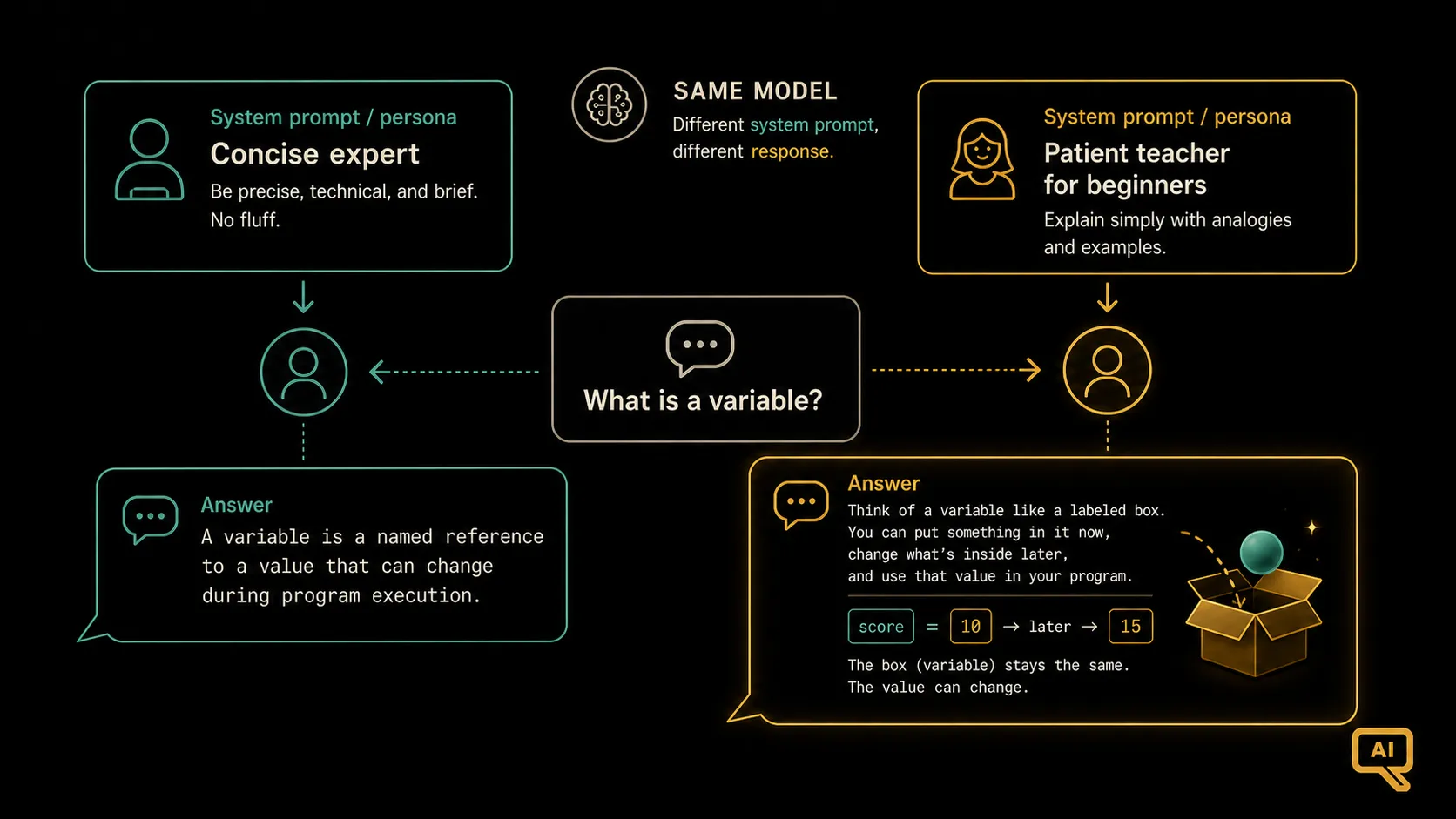 Figure 2: One question, two personas. Set as a concise expert, the model gives a brief technical answer. Set as a patient teacher for beginners, it gives a warm, analogy-rich explanation. Same model, different system prompt.
Seeing it in code
If you’re building with a model, the system prompt and user prompt are usually sent as clearly separate pieces. Even if you never write code, this makes the two-layer idea concrete:
messages = [
    {
        "role": "system",
        "content": (
            "You are a friendly coding tutor for absolute beginners. "
            "Explain with everyday analogies, keep it encouraging, and "
            "always explain code before showing it."
        )
    },
    {
        "role": "user",
        "content": "What is a variable in programming?"
    }
]
The system message sets the persona once; the user message is the actual question. Every response the model gives will be shaped by that system message, even as the user messages change throughout the conversation.
Tips for a good persona
A few practical guidelines that make a big difference:
- Put durable rules in the system prompt, per-task details in user prompts. The system prompt is for things that should hold all conversation long (tone, role, boundaries). Specific one-off requests belong in the user message. Don’t cram a specific task into the system prompt, and don’t repeat your whole persona in every user message.
- Be specific about tone and defaults. “Be helpful” is too vague to do much. “Keep answers under 150 words unless asked for more; use plain language; lead with the direct answer” actually shapes behaviour.
- Set boundaries explicitly. If there are things the model should refuse, redirect, or always include, say so clearly in the persona rather than hoping it infers them.
- Test the persona. Try a range of questions and check the model stays in character and follows its rules. (This connects to evaluating prompts, coming up shortly.)
Why this layer matters
The system prompt is one of the most useful levers in prompting. It’s the difference between a model that behaves consistently and appropriately, and one that’s a coin toss from message to message. If you build with these models, persona design is where a lot of your product’s quality and character will live. And even as a user, knowing this layer exists, and that you can often shape it, gives you more control over the tools you use every day.
We’ve now covered shaping the model’s inputs, outputs, and overall behaviour. Next, we tackle the reliability problem from the AI Primer: the model confidently making things up, and the prompting techniques that reduce it.
Next in the series: Reducing Hallucination Through Prompting: practical wording that keeps the model honest.