
So far in this track, we’ve mostly been getting the model to write things for people to read. But some of the most useful things you can build with a language model involve feeding its output into another program: a spreadsheet, a database, an app, a bit of code. And a program is a much fussier reader than a person. Give a human a slightly messy answer and they’ll shrug and cope. Give a program a slightly messy answer and it breaks.
This article is about getting structured output: clean, predictable, machine-readable results. It’s the difference between a fun demo and something you can actually build on.
Why a program needs structure
Imagine you ask a model to pull the key details out of a customer email, and it replies:
“Sure! It looks like the customer’s name is Priya, she’s writing about order 4471, and she seems pretty frustrated about a late delivery.”
Lovely for a human. Useless for a program. Your code has no reliable way to fish “Priya,” “4471,” and “frustrated” out of that friendly sentence. The wording changes every time, and there’s no fixed place to look.
What a program wants instead is something rigidly predictable, like this:
{"name": "Priya", "order_id": "4471", "sentiment": "negative"}This is JSON, a simple, universal format for structured data. It’s just labelled fields and values, and nearly every programming language can read it instantly. The values are always in the same, named places, so your code knows exactly where to look. Figure 1 shows the contrast.
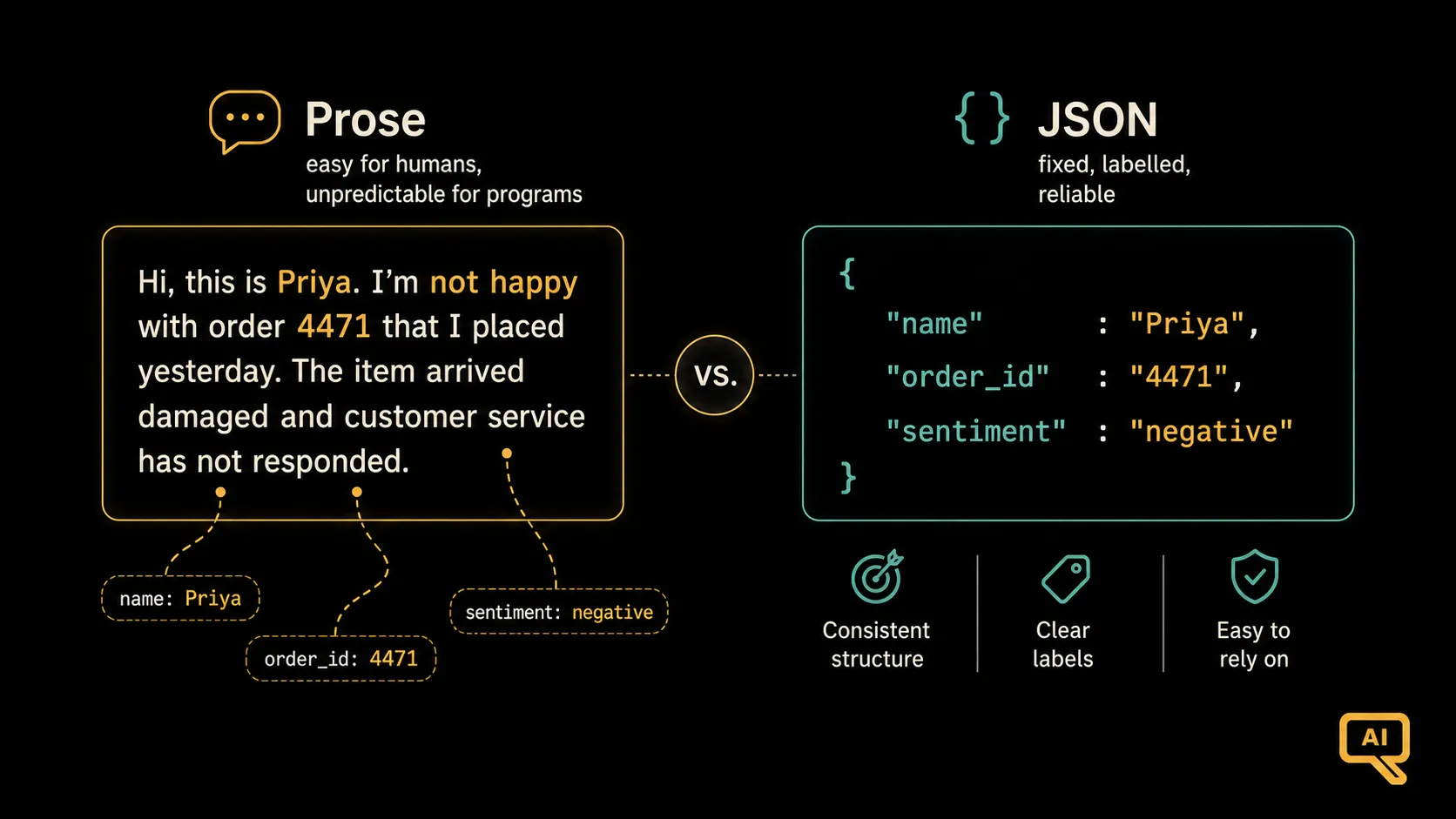 Figure 1: The same information, two forms. Prose is easy for a human but unpredictable for a program. JSON puts every value in a fixed, labelled place, so code can use it reliably.
You don’t need to be a programmer to care about this. Any time you want a model’s output to flow automatically into another tool rather than being read by a person, structured output is what makes it possible.
How to ask for it
Getting reliable structured output comes down to three habits. Do these, and models are much better at complying.
1. Specify the exact shape you want. Don’t just say “give me JSON”. Show the precise fields and their types. Spell out the schema:
Extract the details from the message and return the result as JSON
with exactly these fields:
{
  "name": string,
  "order_id": string,
  "sentiment": "positive" | "neutral" | "negative"
}
2. Say “only JSON, nothing else.” Left to its friendly instincts, a model loves to add a chatty preamble, “Sure, here’s the JSON you asked for!”, which promptly breaks your program. Head it off explicitly: “Return ONLY valid JSON, with no other text, no explanations, and no markdown formatting.”
3. Tell it what to do about missing pieces. Real data is messy; sometimes a field just isn’t there. Decide the behaviour in advance so the model doesn’t improvise: “If a field can’t be found, set its value to null.” This one instruction prevents a lot of surprises.
Put together, a solid extraction prompt looks like this:
You are a data extraction assistant. From the message between the triple
quotes, extract the details and return ONLY valid JSON (no other text) in
exactly this shape:
{ "name": string, "order_id": string, "sentiment": "positive"|"neutral"|"negative" }
If a field can't be determined, use null.

Message:
"""
Hi, this is Priya. My order 4471 still hasn't arrived and I'm really unhappy.
"""
Don’t fully trust it: verify
Here’s the practical reality: even with a strong prompt, a model will occasionally slip, add a stray word, miss a comma, or wrap the JSON in markdown. Most of the time it works; once in a while it doesn’t. So for anything real, don’t just hope the output is valid. Check it, and try again if it isn’t. Figure 2 shows this simple safety loop.
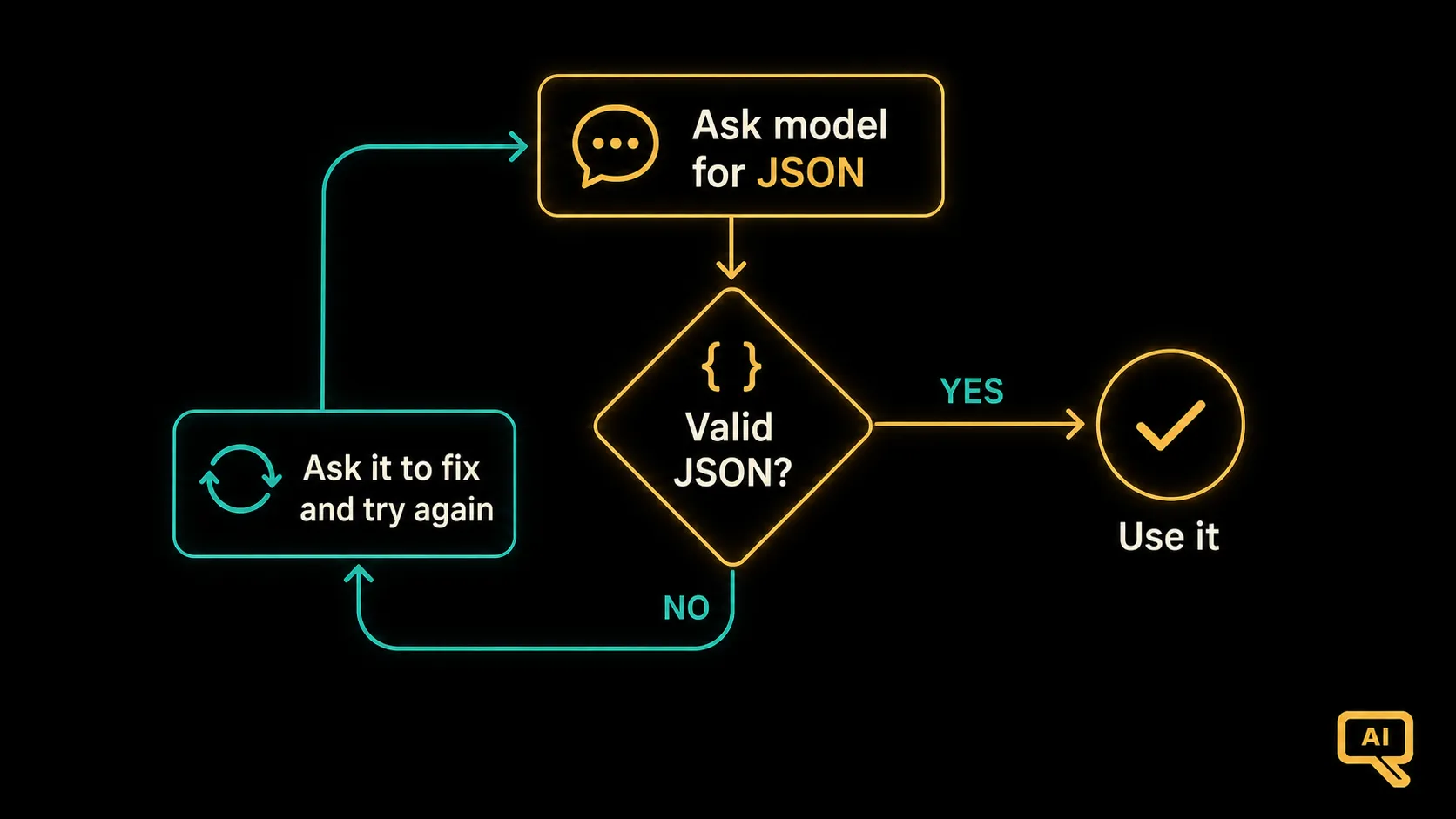 Figure 2: Ask for structured output, then validate it. If it parses cleanly, use it. If not, ask the model to try again. This simple loop turns “usually works” into “reliably works.”
In code, that loop is short and well worth it:
import json

def get_valid_json(ask_model, prompt, max_tries=3):
    for attempt in range(max_tries):
        response = ask_model(prompt)          # your function that calls the model
        try:
            return json.loads(response)       # success: it parsed as real JSON
        except json.JSONDecodeError:
            prompt += "\n\nThat wasn't valid JSON. Return ONLY valid JSON."
    raise ValueError("Could not get valid JSON after several tries.")
The pattern is simple: attempt to parse the output as real JSON; if it works, you’re done; if it doesn’t, nudge the model and retry a couple of times. This tiny bit of defensiveness is the difference between a system that falls over on its first odd input and one that quietly handles the occasional hiccup.
A shortcut worth knowing
One helpful development: many AI tools and services now offer a built-in “JSON mode” or “structured output” setting that guarantees the output is valid JSON matching a shape you specify. If the tool you’re using has it, turn it on. It does the enforcing for you and removes most of the fragility. It doesn’t replace the good habits above (you still specify the shape and handle missing fields), but it takes the “is this even valid JSON?” worry off your plate. When it’s available, use it.
Why this pattern unlocks so much
Structured output might feel like a technicality, but it’s what lets a language model become a component in something bigger rather than just a chat window. Extracting data from documents, sorting incoming messages, filling out forms, feeding results into a dashboard; all of these depend on the model producing output that a program can trust. Master this one pattern and you can start wiring models into useful automation.
We’ve now covered getting the model to output cleanly. But there’s a subtle risk hiding whenever you paste outside text, such as a document, an email, or a web page, into a prompt for the model to work on. That pasted text can accidentally (or deliberately) get confused with your instructions, with results ranging from annoying to unsafe. Handling that safely is a small skill with big consequences, and it’s what we’ll cover next.
Next in the series: Delimiting Context & Prompt-Injection Basics: safely feeding outside text into your prompts.