
Semantic search is a genuinely lovely idea, and most of this track has been about how to use it well. But I have to be honest with you about a weakness it has, because ignoring it will cost you some very real, very confusing bad results. Semantic search sometimes misses the obvious stuff. Product codes. Error identifiers. Names. Exact phrases. Things you’d expect a plain word-for-word search to nail effortlessly.
The fix is to stop pretending one method is enough. Combine semantic search with old-fashioned keyword search, and let each one do what it’s genuinely good at. That combination is called hybrid search, and it’s a small change that solves a real, common class of misses.
The weakness worth naming
Recall that semantic search compares embeddings, which represent meaning. That’s brilliant when the question and the answer use different words for the same idea. But sometimes there’s no meaning to interpret. Sometimes the “meaning” is literally the specific string. For example:
- A user searches for the error code
E-402. Embeddings care little about arbitrary codes, soE-402andE-401sit close together in meaning-space even though they’re two very different errors. - A user searches for a product SKU like
SKU-778X. To an embedding, it’s a nearly meaningless jumble of characters. - A user searches for a person or company name:
Ravi Menon. Names carry little semantic content by themselves.
For all of these, a plain keyword search (of the boring, decades-old “find me the exact string” kind) would return the right chunk instantly. Semantic search may not. Not because it’s broken, but because it was built to find similar meanings, and the query isn’t really about meaning. It’s about the literal characters.
That gap is where hybrid search lives.
Two searches, one result
Hybrid search is exactly what the name promises: run both a semantic search and a keyword search, then combine the results. Each method contributes its strength. Semantic handles the messy paraphrases and synonym gaps. Keyword handles the exact codes, names, and precise phrases. Between them, they cover far more ground than either alone. Figure 1 shows the shape.
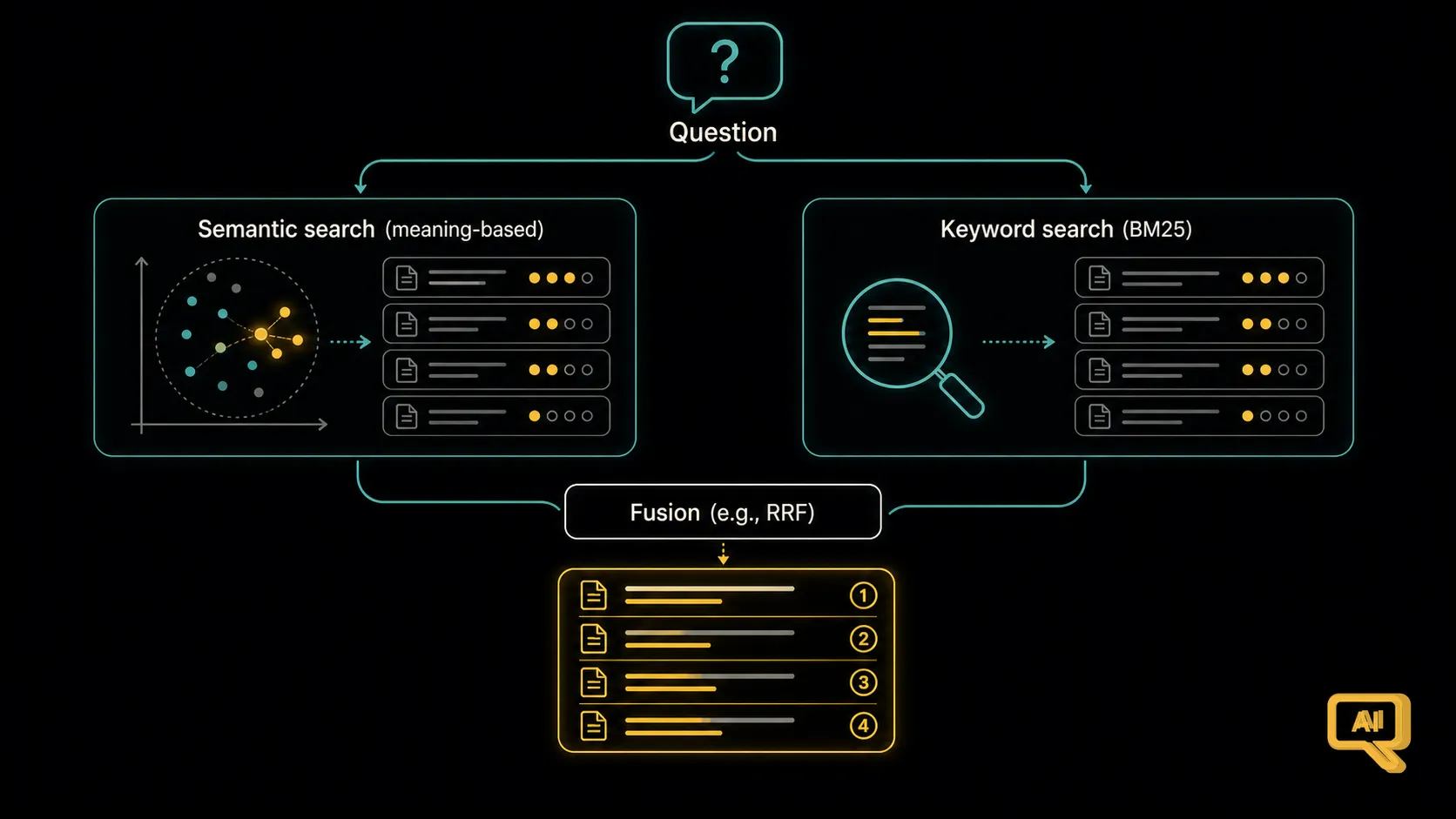 Figure 1: A hybrid search runs the two methods in parallel. Semantic search catches the paraphrases and same-meaning-different-words matches. Keyword search catches the exact codes, names, and phrases. Their results are then merged into a single ranked list.
The “keyword search” side has an old and battle-tested method behind it called BM25. You don’t need the maths; the intuition is that it scores each chunk by how much of the query’s exact words it contains, adjusted for how common each word is. A word like “the” barely counts (it’s everywhere); a word like “E-402” counts heavily (rare and specific). It’s a beautifully practical algorithm, and most vector databases and search engines offer it or something similar right alongside their vector search.
Merging the two lists
Once you have two ranked lists of candidates, you have to combine them into one. There are a couple of straightforward ways.
The most common and pleasantly simple technique is called Reciprocal Rank Fusion, or RRF. It looks scary and isn’t. The idea is: for each candidate chunk, look at what position it appeared at in each of the two lists, and give it a score based on those positions. Chunks that placed highly on both lists get the best combined score. Chunks that appeared strongly on just one list still get credit, but less. In pseudocode, it’s just:
def rrf_score(rank_semantic, rank_keyword, k=60):
    # A chunk that ranks 1st in a list contributes 1 / (60 + 1); 2nd contributes 1/(60+2); ...
    s = 0
    if rank_semantic  is not None: s += 1 / (k + rank_semantic)
    if rank_keyword   is not None: s += 1 / (k + rank_keyword)
    return s
Then you sort chunks by that combined score and take the top few. The elegant thing about RRF is that it doesn’t require the two searches to be comparable in scale; it only cares about rank order, which is easy to compare fairly.
The other approach, sometimes called weighted score fusion, blends the raw scores of the two searches with a weight, like 0.6 semantic + 0.4 keyword. It’s flexible but a bit fussier because you have to tune the weights. For most people RRF is the sensible starting point.
When hybrid earns its keep
Figure 2 shows the kinds of queries where hybrid genuinely rescues you.
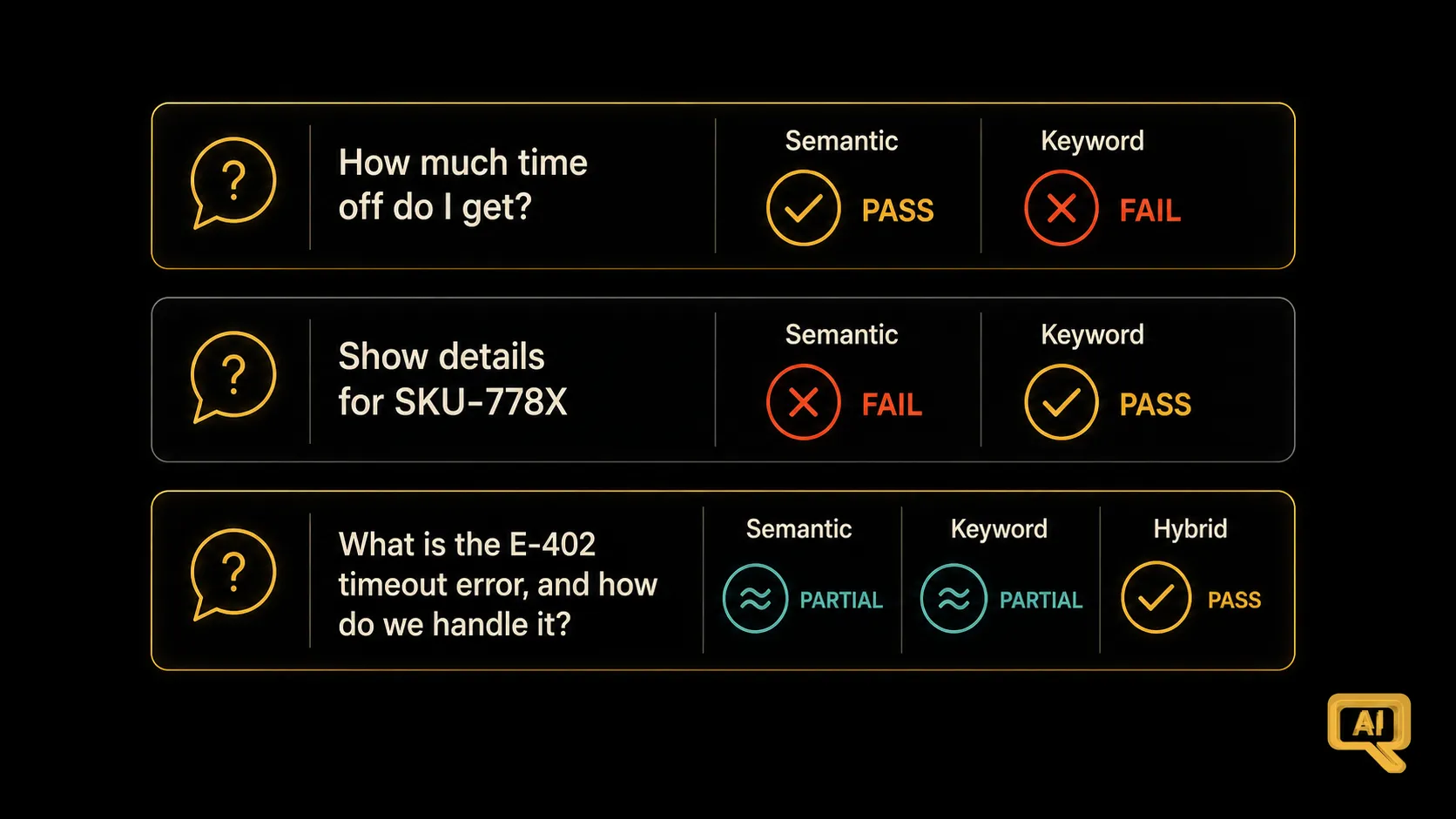 Figure 2: For paraphrased or same-meaning queries, semantic alone is fine. For exact codes and names, keyword alone is fine. But real users mix both. Hybrid quietly handles all three, without you having to guess which mode a given question needed.
The really useful insight from that comparison is that real user questions come in all three flavours, and you often can’t tell which flavour a question is going to be. You’d rather not build a system that works on paraphrased questions and fails silently on the ones with a product code in them. Hybrid gives you a single retrieval that gracefully handles the whole spread, and you didn’t have to decide in advance which type of question your user was going to ask.
Where hybrid sits in your pipeline
Hybrid search doesn’t replace the two-stage pattern from the last article; it enhances stage one. You run both semantic and keyword search, merge the candidate lists, and then pass that merged shortlist through your re-ranker (if you have one) for the final polish. In effect, you’re broadening your net before the careful second look. The order of upgrades that tends to work well in practice:
- Get the basics right (chunking, sensible top-k, grounded prompt).
- Add hybrid search when you notice keyword-like misses (codes, names, phrases).
- Add re-ranking when the right chunk is often in your top-20 but not on top.
Doing one, then the other, is a good, low-risk path.
A few practical notes
A short list of things worth knowing, because they’ve tripped up plenty of people:
- Check what your vector database supports. Many modern vector databases (Weaviate, Qdrant, Elasticsearch with vector support, pgvector with text search, and others) can do both types of search out of the box, and even fuse them for you. If you’re already using one, check the docs for “hybrid” or “BM25” support before writing your own fusion code.
- Case, punctuation, and stop-words matter for the keyword side. BM25 cares about the actual words. A little care with lowercasing, punctuation handling, and stop-word filtering can nudge quality up.
- Metadata filters still apply. Everything from the metadata filtering article still works. You can filter the collection first, then hybrid-search within it.
- Watch the same debugging habit. When something goes wrong, log which of the two searches contributed which chunks. If it’s always the keyword side rescuing you, your semantic setup may need work; if it’s always the semantic side, keyword may be underused.
Where we go from here
We’ve now covered the two most impactful upgrades to plain semantic search: adding a careful second pass with re-ranking, and broadening the first pass with hybrid search. Together they lift a basic pipeline into something that quietly holds up under real-world variety.
But there’s a whole other class of retrieval problem we haven’t tackled yet: questions that a single retrieval, no matter how good, simply can’t handle well on its own. Questions that need the pipeline to rephrase them, or to fetch information in more than one step. Handling those is the topic of advanced RAG, and it’s next.
Next in the series: Advanced RAG: Query Rewriting & Multi-Step Retrieval, for the questions a single retrieval can’t answer well.