We’ve now got the elegant idea that makes RAG possible: turn every passage into an embedding, and search by closeness in that meaning-space. It works beautifully with a hundred passages. But the moment your document collection grows — thousands, then hundreds of thousands, then millions of chunks — a hidden problem shows up. Comparing your question against every stored embedding, one by one, becomes hopelessly slow.
This is where vector databases come in. They’re the specialised storage engines that make embedding-based search fast, at any real scale. This article demystifies what they are, how they pull off the “fast” part, and how to choose one without agonising over it. You don’t need to become a database expert — you just need enough understanding to make good decisions.
The problem in plain terms
Let me put a rough number on it. Suppose you have a million document chunks, each with an embedding — a list of, say, 1,536 numbers. When a question arrives, you turn it into its own embedding and want to find the closest ones. The naïve approach — compute the similarity between your question and every one of the million stored embeddings, then pick the top matches — works, but it can be painfully slow, and the trouble grows with your collection.
A vector database is a piece of software specifically built to solve this: to store enormous numbers of embeddings and find the nearest neighbours to any query embedding very quickly. That’s really the whole job. Figure 1 shows what one is and where it sits in a RAG system.
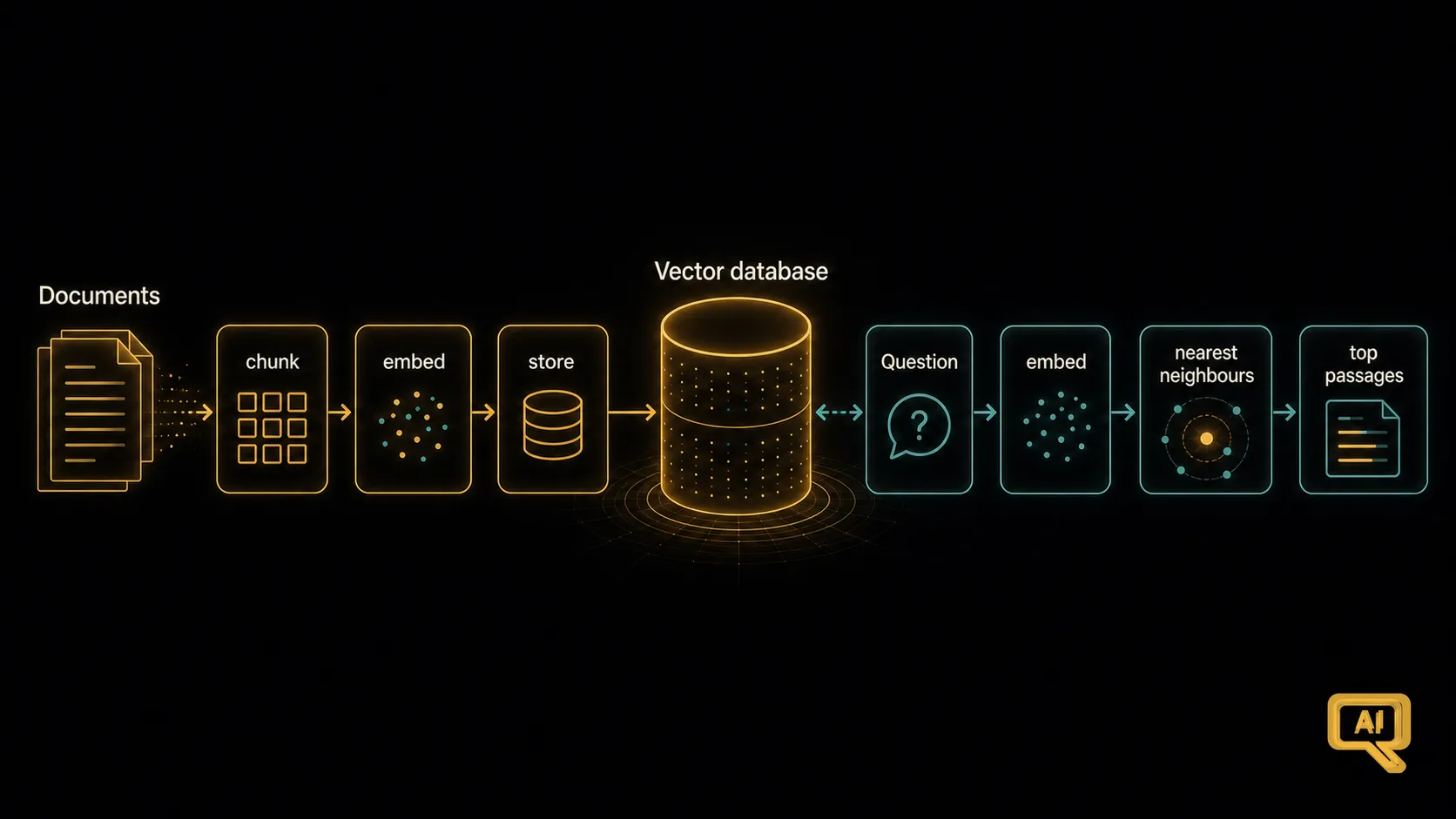 Figure 1: A vector database stores all your document embeddings. When a question arrives, it takes the question’s embedding and quickly returns the nearest neighbours — the passages most similar in meaning.
The clever trick: approximate nearest neighbours
Here’s the interesting part. Vector databases achieve their speed with a small, honest cheat: they don’t guarantee the perfectly closest matches. They return the approximately closest — near-neighbours that are almost always the true nearest, or near enough that it doesn’t matter in practice, but found far faster than by exhaustive checking.
This family of techniques goes by the name Approximate Nearest Neighbour (ANN) search. The intuition is like organising a library. If books were scattered randomly, finding the ones on Roman history would mean checking every shelf — slow. But once the librarian groups similar books together, you can walk straight to the “history” section, then to “Rome,” and check just a small handful. You might occasionally miss a technically nearer match in some odd corner, but you find excellent matches almost instantly. Vector databases do a mathematical version of exactly this — they organise the embedding space so most of it can be skipped when answering a query.
This trade-off — accept “very slightly approximate” in exchange for “massively faster” — is what makes semantic search over millions of embeddings genuinely practical.
What using a vector database looks like
The good news is you don’t have to build any of this. From your side, using a vector database is refreshingly straightforward. In pseudocode:
# Set up your searchable collection ahead of time
db.add(items=[
    {"id": "chunk_1", "embedding": embed(text_1), "metadata": {"source": "handbook.pdf", "page": 3}},
    {"id": "chunk_2", "embedding": embed(text_2), "metadata": {"source": "handbook.pdf", "page": 4}},
    # ... millions more ...
])

# At query time
q_emb = embed(user_question)
nearest = db.search(query_embedding=q_emb, top_k=5)
# nearest -> the 5 most similar chunks, with their metadata
Two things are worth calling out here. Each stored item has three parts: an ID (some unique reference), the embedding (the numbers), and metadata (useful extras — the source file, the page number, tags). That metadata will matter more than you’d expect, because you’ll often want to filter your search: only look at chunks from this document, or from after a certain date. Good vector databases let you combine similarity search with metadata filters efficiently — a small feature that’s disproportionately useful in real applications.
How to choose one (without agonising)
The market for vector databases has exploded, which can make choosing feel harder than it needs to be. Let me cut through it. There are three broad categories, and one of them almost certainly fits your situation. Figure 2 lays them out.
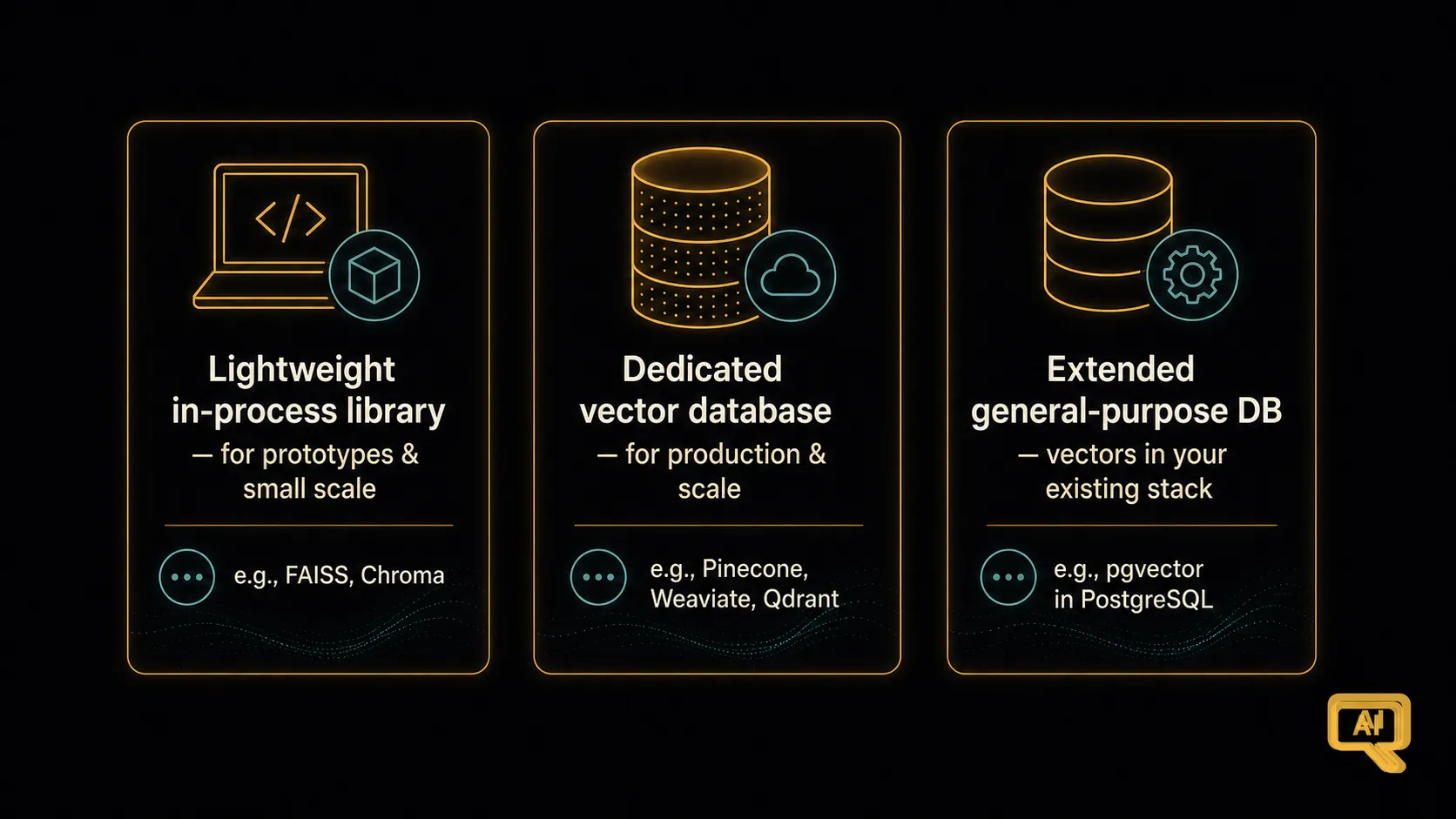 Figure 2: Three practical categories. A lightweight in-process library for prototypes and small scale, a full managed vector database for production and scale, and a familiar general-purpose database extended with vector support for teams who want fewer moving parts.
Lightweight, in-process libraries — these are simple libraries that live inside your own code and store embeddings in memory or a local file. They’re the fastest way to prototype and are perfectly good for small collections and personal projects. Examples you’ll encounter: FAISS, Chroma, LanceDB. When you’re learning, or building something small, start here — no servers, no accounts, no fuss.
Dedicated vector databases — full standalone services (or managed cloud services) built specifically for vector search at production scale, with all the trimmings: massive collections, high query volume, filtering, hybrid search, updates, backups. Examples: Pinecone, Weaviate, Qdrant, Milvus. When you’re building a real product with meaningful scale, this is often where you land.
Extended general-purpose databases — the database you already use (PostgreSQL, Elasticsearch, Redis, MongoDB, and others) with vector support added. If your team already knows and runs one of these, keeping vectors in the same place — often via an extension like pgvector for PostgreSQL — is a very sensible way to avoid adding a whole new system to your stack. Simplicity has real value.
A practical rule of thumb: prototype with a lightweight library; ship your first serious system on whichever category matches your team’s existing skills and your scale; upgrade only when a concrete need forces it. Don’t pick the most impressive-sounding option — pick the one that fits.
What actually matters when comparing them
If you do need to compare seriously, four things matter far more than the marketing:
- Scale — how many embeddings, and how fast, at the volume you actually need.
- Filtering — can you combine similarity search with structured filters (by date, source, tag) efficiently?
- Hybrid search — can it combine semantic search with old-fashioned keyword search? This is a genuine quality booster we’ll cover later in the track.
- Operational fit — does it fit your team’s skills, your hosting setup, your budget, and your data-residency requirements?
These four together will steer you to the right choice for your situation, and they matter far more than exact performance numbers on someone else’s benchmark.
The plumbing under the pattern
Vector databases are, in a sense, the humble plumbing of RAG — the thing that makes the elegant “search by meaning” idea work at scale. Once you understand what they do, you’ll see them everywhere in modern AI applications, quietly powering the retrieval step.
We’ve now covered the machinery: how meaning becomes numbers, and how those numbers get stored and searched fast. Which brings us to the least glamorous but most impactful decision in all of RAG — one where getting it right dwarfs almost any other choice you’ll make. It’s the question of how you slice up your documents before you ever embed them: chunking. That’s next.
Next in the series: Chunking Strategies That Make or Break RAG — the surprisingly high-leverage decision of how to split your documents.