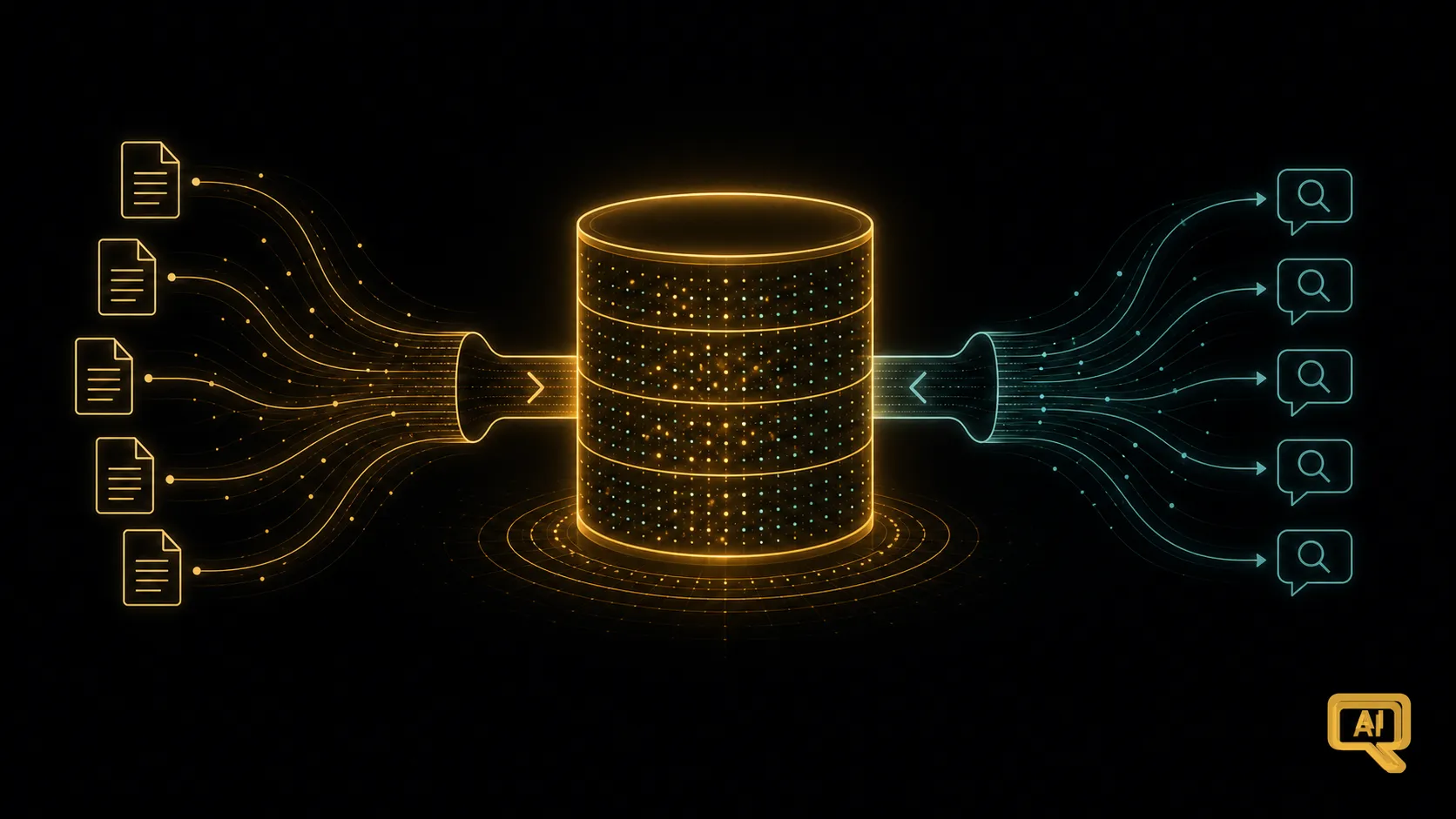
So far, we’ve built up the ingredients of RAG one at a time — the idea, embeddings, semantic search, vector databases, chunking. In this article, I want to step back and show you how they fit together into a complete pipeline. Because once you’ve seen the whole thing on one page, RAG stops feeling like a collection of clever tricks and starts feeling like a single, coherent architecture you could actually build.
This is a conceptual walk-through — not a hands-on tutorial (that’ll come in the Use Cases track) — but you’ll leave with the mental blueprint of a real RAG system. That blueprint is a huge amount of the battle. Everything else is refinement.
The one big insight: two phases, not one
Here’s the shift in thinking that unlocks the whole picture. A RAG system isn’t one single flow — it’s two phases, done at different times.
There’s an ingestion phase, which you do once (or whenever your documents change): take your documents, prepare them, and build them into a searchable collection. Then there’s a query phase, which happens every single time a user asks a question: search that collection and generate a grounded answer.
These two phases are separate, and understanding that they’re separate is what makes RAG click. Figure 1 lays out the full pipeline, with both phases side by side.
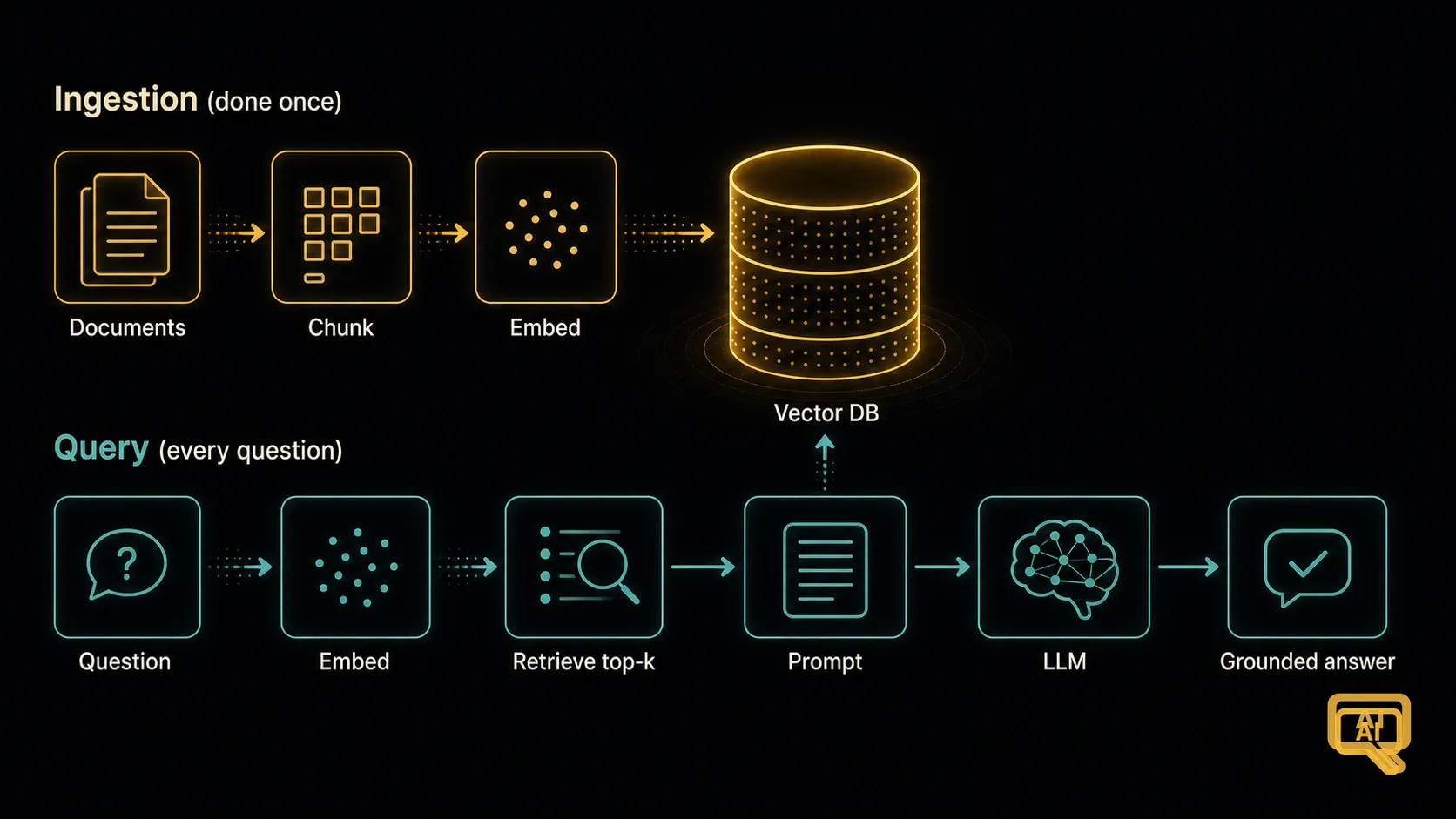 Figure 1: The two phases of a RAG system. Ingestion (done once, ahead of time) turns your documents into a searchable vector database. Query (every time a user asks) retrieves the relevant chunks and generates a grounded answer.
Let’s walk through both phases, since each has its own logic.
Phase 1: Ingestion — building the searchable collection
This is the setup phase. Its goal is to take your raw documents and turn them into something you can search by meaning. It has four steps.
Step 1 — Load the documents. Read them in from wherever they live: PDFs, web pages, wikis, databases, spreadsheets. Real documents come in messy formats, and getting the text out cleanly is often more work than you’d think — expect to spend real time on it.
Step 2 — Chunk them. Split each document into passages, using the ideas from the last article: sensible size, some overlap, respecting the document’s structure where you can. Attach useful metadata to each chunk — source file, page or section, any tags you care about — because you’ll be glad of it later.
Step 3 — Embed each chunk. Run every chunk through an embedding model to get its vector — its location in meaning-space.
Step 4 — Store it all in the vector database. Save the chunk text, its embedding, and its metadata as a single record. Do this for every chunk, and you now have a searchable collection ready for questions.
In pseudocode, all four steps come together like this:
# ---- Ingestion (done once, or whenever documents change) ----
for document in load_documents():                     # step 1
    for chunk, meta in chunk_document(document):      # step 2
        vector = embed(chunk)                         # step 3
        vector_db.add(text=chunk,
                      embedding=vector,
                      metadata=meta)                  # step 4
That’s it — the entire ingestion phase in a handful of lines. Notice how each earlier article maps to one step here.
Phase 2: Query — retrieving and generating
Now the runtime phase. Every time a user asks a question, this is what happens.
Step 1 — Embed the question. Use the same embedding model, so the question’s vector lives in the same meaning-space as the chunks.
Step 2 — Search the vector database. Find the top few chunks whose embeddings are closest to the question — the passages most likely to contain the answer. This is the retrieval step. Usually you fetch a small handful, maybe five to ten.
Step 3 — Assemble the prompt. Combine the retrieved chunks with the user’s question into a single, well-structured prompt that tells the model exactly what to do with them.
Step 4 — Generate the answer. Send that prompt to the language model. It reads the retrieved passages, reasons over them, and produces a grounded answer.
Here’s the same phase as code:
# ---- Query (runs on every user question) ----
q_emb = embed(user_question)                          # step 1
chunks = vector_db.search(q_emb, top_k=5)             # step 2
prompt = build_prompt(user_question, chunks)          # step 3
answer = model.generate(prompt)                       # step 4
The two phases together are the whole pipeline. That’s the mental blueprint.
The prompt is where the grounding happens
Step 3 of the query phase deserves a closer look, because it’s where a lot of RAG’s quality actually lives. The retrieved chunks are useless until you package them up correctly for the model. Figure 2 shows what a good RAG prompt looks like.
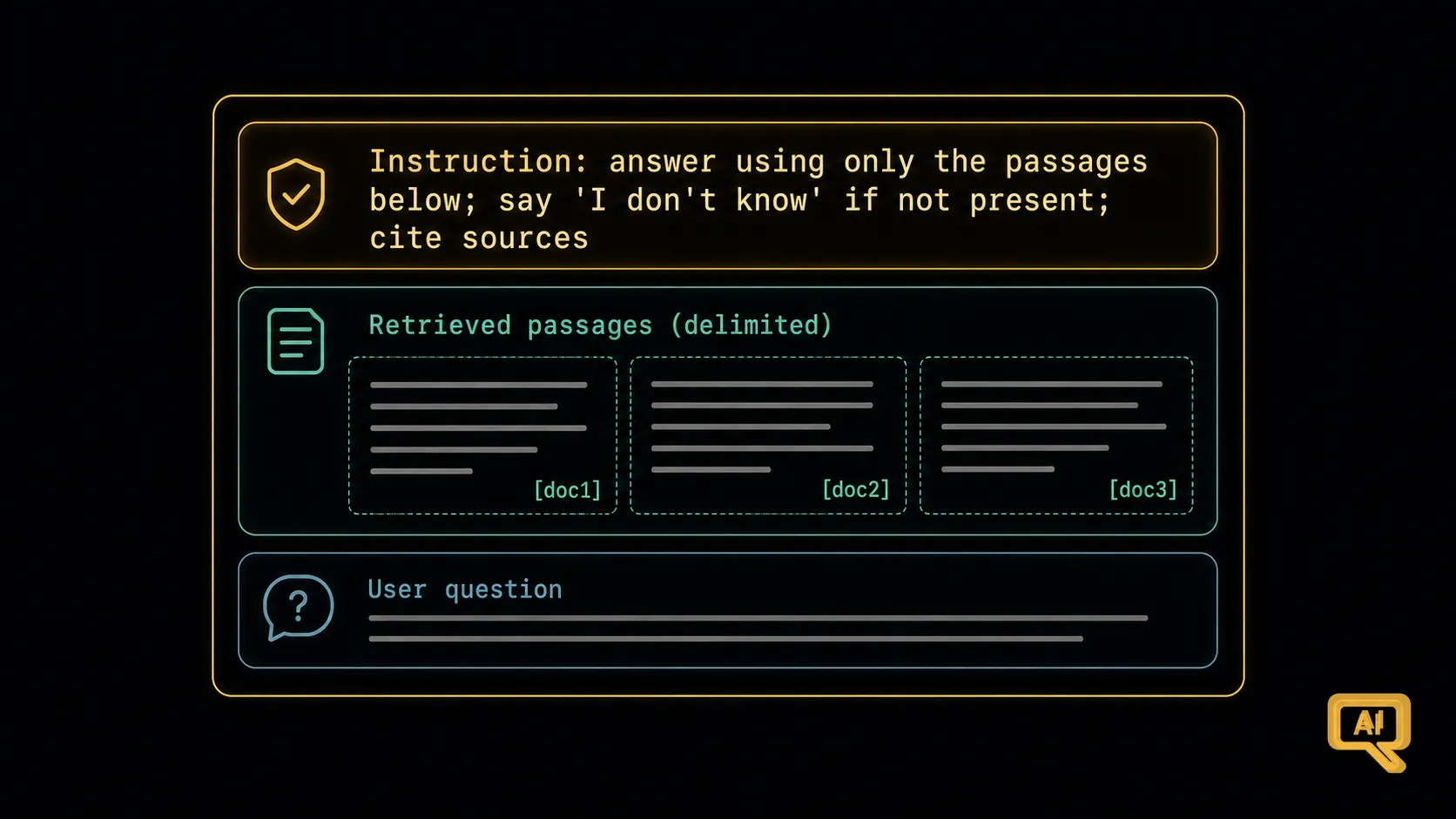 Figure 2: A grounded RAG prompt has three parts — an instruction that anchors the model to the provided passages, the retrieved chunks themselves (clearly delimited), and the user’s question. Extra instructions (“say I don’t know if the answer isn’t there”) sharply reduce hallucination.
The template that reliably works looks something like this:
You are a helpful assistant. Answer the question using ONLY the
information in the passages below. If the answer isn't in the passages,
say "I couldn't find that in the provided documents." Cite the source
of each fact.

Passages:
"""
[chunk 1 — with its source metadata]
[chunk 2 — with its source metadata]
[chunk 3 — with its source metadata]
"""

Question: [the user's question]
Look at what’s happening in that prompt. It’s every good habit from the Prompt Engineering track showing up at once — grounding the model in real source material, delimiting the data so it isn’t confused with instructions, giving it permission to say “I don’t know,” and asking for citations. RAG isn’t a replacement for good prompting; it’s good prompting plus the right context to prompt with.
Common misconceptions worth clearing up
A few things beginners often get wrong. Now’s a good time to head them off.
“The vector database is the AI.” It’s not. It’s a search tool. The language model is what actually reads the retrieved passages and writes the answer.
“More retrieved chunks are always better.” Not really. Piling in dozens of chunks dilutes the model’s focus and clutters the prompt. Five to ten well-chosen chunks usually beats fifty muddled ones.
“You need to re-ingest everything constantly.” Only re-ingest what changed. Most systems ingest a document once and update it only when the source changes.
“If RAG’s answer is bad, the model is bad.” Almost never. If RAG is giving bad answers, the problem is nearly always in retrieval or chunking — the model got weak material and did the best it could with what it was given. That “look at what was retrieved” habit we’ve talked about is your compass here.
From blueprint to production
This is the shape of a working RAG system. It’s not the only shape — there are variations and improvements we’ll dig into throughout the track — but the two-phase pipeline is the trunk, and everything else branches off it.
The next few articles zoom in on making each step actually good: how retrieval itself has more knobs than you’d think, how to diagnose problems when the answers are wrong, how to boost quality with re-ranking and hybrid search, and how to handle really hard multi-part questions. Every one of those is really a refinement to something on this page. But now you have the map — and with the map, the improvements are additions, not mysteries.
We’ll begin with a closer look at the retrieval step itself — because there’s more happening in that innocent-looking “search the vector database” line than you might expect.
Next in the series: Retrieval: Similarity, Top-k & Metadata Filtering — the knobs and dials of the search step itself.