
Even with a well-tested, well-monitored, well-tuned language model in production, some things are always going to be worth catching before they reach a user, or before they’re passed to a downstream system. A model that occasionally produces a rude reply. A user who tries to extract a private prompt. An output that accidentally includes personal data that should have been redacted. These aren’t the everyday quality concerns that evaluation and monitoring handle; they’re specific, targeted risks that deserve their own live protection.
That live protection is called guardrails, and this article is about how to design them well: what they cover, where they sit in your request path, and how to build them without turning your system into a maze of paranoid checks.
What guardrails are, in one sentence
A guardrail is a specific, targeted check that runs on inputs or outputs at request time, blocking or modifying things that would otherwise be unsafe, non-compliant, or plain wrong for your use case.
Notice the word “targeted.” Guardrails aren’t a universal safety layer; they’re specific defences against specific risks you can name. “Don’t leak personal data” is a guardrail. “Don’t respond to prompt injection attempts” is a guardrail. “Only produce responses in the languages we support” is a guardrail. Each one has a clear job and a clear success criterion. Trying to build one giant “make everything safe” layer is how you end up with a system that’s slow, brittle, and still doesn’t catch what you actually cared about.
The two-sided architecture
Guardrails live in two natural places in your system: on the way in and on the way out. Figure 1 shows the shape.
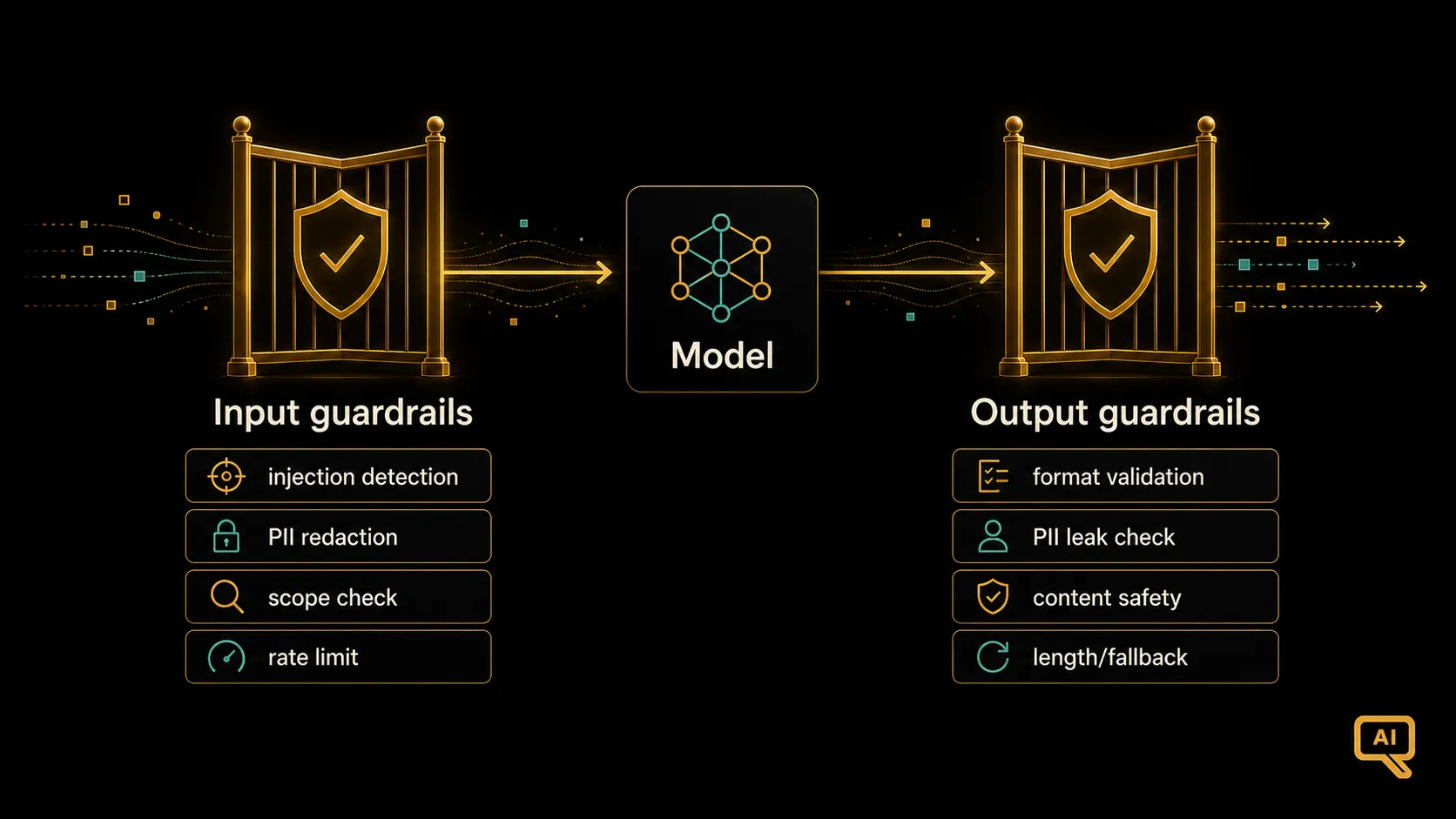 Figure 1: Guardrails sit as small checks on each side of the model. Input guardrails filter or transform requests before they reach the model. Output guardrails check the model’s responses before they reach the user (or a downstream system). Together they form a lightweight but effective safety layer.
Input guardrails run on the user’s request before it reaches the model. Their job is to catch things that shouldn’t be sent to the model at all: obvious abuse, clear injection attempts, requests outside your product’s scope, or inputs that need to be normalised or redacted first.
Output guardrails run on the model’s response before it reaches the user or the next system. Their job is to catch things the model produced that shouldn’t be delivered: unsafe content, leaked information, malformed structured output, responses in the wrong language, or answers that don’t match what your product is supposed to do.
The two sides are complementary. Input guardrails prevent problems from starting; output guardrails catch problems that started anyway. You need both, because neither one catches everything.
What to actually guard against
The specific guardrails you need depend on your application, but a small set of them shows up in almost every real system. Here are the common ones worth naming, since knowing the categories helps you avoid missing anything obvious.
Prompt injection detection. For any system that reads outside text (user uploads, web pages, retrieved documents), the delimiting habit from the Prompt Engineering track is your first defence. An input guardrail can add a second one: scan incoming untrusted text for known injection patterns (things like “ignore previous instructions,” or attempts to redefine the system prompt), and flag or strip them. Not a complete defence, but a real one.
Personal data (PII) handling. If your users send inputs that contain names, email addresses, phone numbers, or other identifying details, you probably don’t want that data sitting in your logs or being echoed back in responses. Input guardrails can detect and redact PII before the request is stored or sent onward. Output guardrails can check the response doesn’t accidentally include something the user shouldn’t see.
Content safety. Depending on your product, there are categories of content you don’t want the model to produce: violence, sexual content, hate speech, self-harm advice, whatever your policy says. A content-classification guardrail on outputs catches these. Most model providers offer such classifiers as a service, and there are open ones too.
Topic scope. Your product exists to help with certain things and not others. A guardrail can check that the user’s question is within scope, and if not, respond with a polite redirect instead of letting the model wander into unrelated territory.
Output format validity. If your application depends on structured output (JSON, a specific format), a guardrail can validate it and either reject or retry when the model produces something malformed. This is the ask-validate-retry loop from the Prompt Engineering track, formalised as a guardrail.
Rate limiting and abuse detection. Not a content check, but a request-pattern check. If one user is hammering your endpoint or looks like they’re testing for exploits, an input guardrail can slow them down or block them entirely.
Response length and safety fallbacks. A simple guardrail that catches empty responses, or excessively long ones, and returns a safe default like “I couldn’t answer that, please try rephrasing.”
You don’t need every one of these on day one. Pick the ones that match the real risks in your product, and add more as you learn what actually happens in production.
How to build them (without going overboard)
Two design principles that keep guardrails from becoming a nightmare.
Cheap and small first, expensive and clever only when needed. Many guardrail checks are just fast pattern matches, small classifiers, or simple regex-like rules. A PII scanner, a keyword filter, a JSON validator, a request-size check: these run in milliseconds. Do these first. Only reach for slower, model-based checks (like using another language model to grade the response for safety) when the cheap checks aren’t enough. A pipeline of cheap-then-expensive keeps your latency down.
Fail closed, but gracefully. When a guardrail triggers, don’t just crash. Have a well-defined behaviour for each: return a safe fallback response, ask the user to rephrase, log the incident for review, or route to a human. What “fail closed” means in practice is: when in doubt, don’t send the unsafe thing to the user; but the failure mode should still feel like polite refusal, not a broken system.
Figure 2 shows the shape of a well-designed guardrail flow.
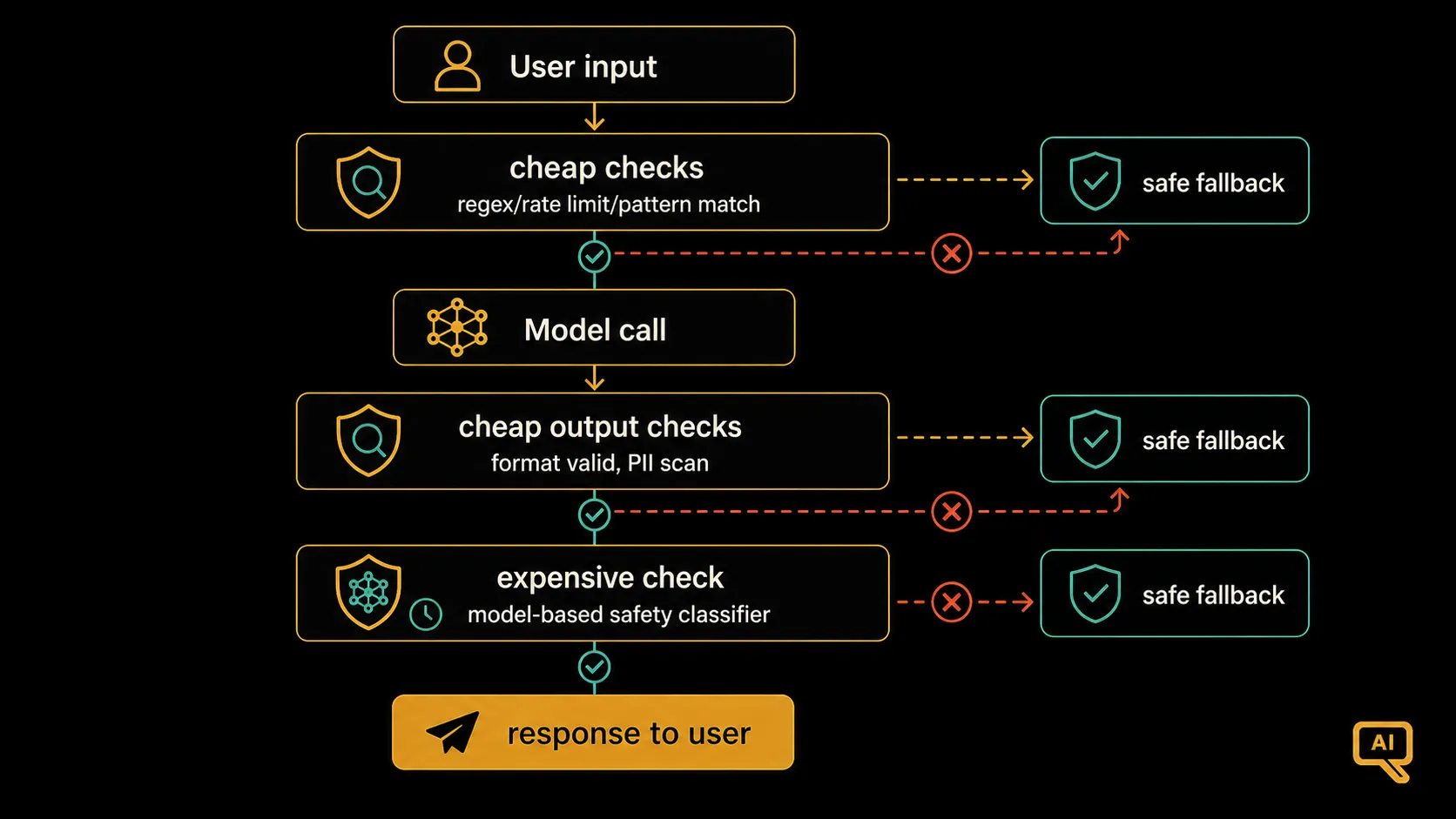 Figure 2: A well-designed guardrail flow runs cheap checks first (fast rejects and simple pattern matches), reserves expensive checks (like model-based safety classification) for cases that pass the cheap ones, and provides a graceful fallback whenever any check fails. Speed for the common case, safety for the risky case.
In pseudocode, a request flow with guardrails might look like this:
def handle_request(user_input):
    # --- Cheap input guardrails first ---
    if is_rate_limited(user_input.user_id):     return safe_fallback("rate limited")
    if is_out_of_scope(user_input.text):        return polite_redirect()
    if contains_injection_pattern(user_input):  return safe_fallback("cannot process")

    redacted = redact_pii(user_input.text)

    # --- Model call ---
    response = model.generate(build_prompt(redacted))

    # --- Cheap output guardrails first ---
    if not is_valid_format(response):           response = retry_with_reminder(redacted)
    if contains_leaked_pii(response):           return safe_fallback("response redacted")

    # --- More expensive output check only if needed ---
    if safety_classifier(response) == "unsafe": return safe_fallback("cannot produce")

    return response
Notice the shape. Fast checks reject the obvious problems early. The model only runs when the request passes basic checks. The response goes through fast validation before any expensive safety classification. Each guardrail has a specific, targeted job. The whole thing is small enough to fit on one page and understand at a glance.
Guardrails aren’t a substitute for the other habits
An honest reminder that ties this whole track together. Guardrails are a valuable last line of defence, but they can’t compensate for weaknesses elsewhere. If your prompts are sloppy, your evaluation is thin, and your monitoring is absent, guardrails will not save you. They’re the specific-risk layer of the safety picture, sitting on top of the general-quality layers you’ve built up in the earlier articles.
The mental model I find helpful: guardrails handle specific, nameable risks that must be caught in real time. Evaluation catches general quality regressions before they ship. Monitoring catches problems once they’re live. Fine-tuning and prompting shape the model’s default behaviour so fewer problems arise in the first place. All four layers work together; none of them alone is enough. A serious system has some of all of them.
The last piece
We’ve now covered most of the LLMOps picture. Serving, monitoring, pre-production evaluation, live guardrails. There’s one more concern that runs through all of them and deserves its own article, because it can quietly dominate the operational reality of an LLM system: cost. The final article of this track pulls together the practical levers for keeping cost under control at scale, so all the good work you’ve built here stays sustainable to run.
Next in the series: Cost Optimisation: Caching, Routing & Model Selection, the practical levers to keep the token bill from eating your margin.