
You’ve got a language model. Maybe it’s a hosted one you’re calling by API. Maybe it’s the LoRA fine-tune we built together earlier in this track. Either way, at some point a real question arrives: how does a model actually get in front of users, at real traffic, reliably? That step, turning a model from an artefact into a live service people can talk to, is called serving, and it’s where a lot of otherwise-good projects quietly stumble.
This article is about how serving works, the honest choice between doing it yourself and using someone else’s service, and the operational habits that make either path succeed. Nothing here is exotic. Once you can see the shape of it, choosing well becomes a lot easier.
The two big paths
There are broadly two ways to get a language model into production. Figure 1 lays them out.
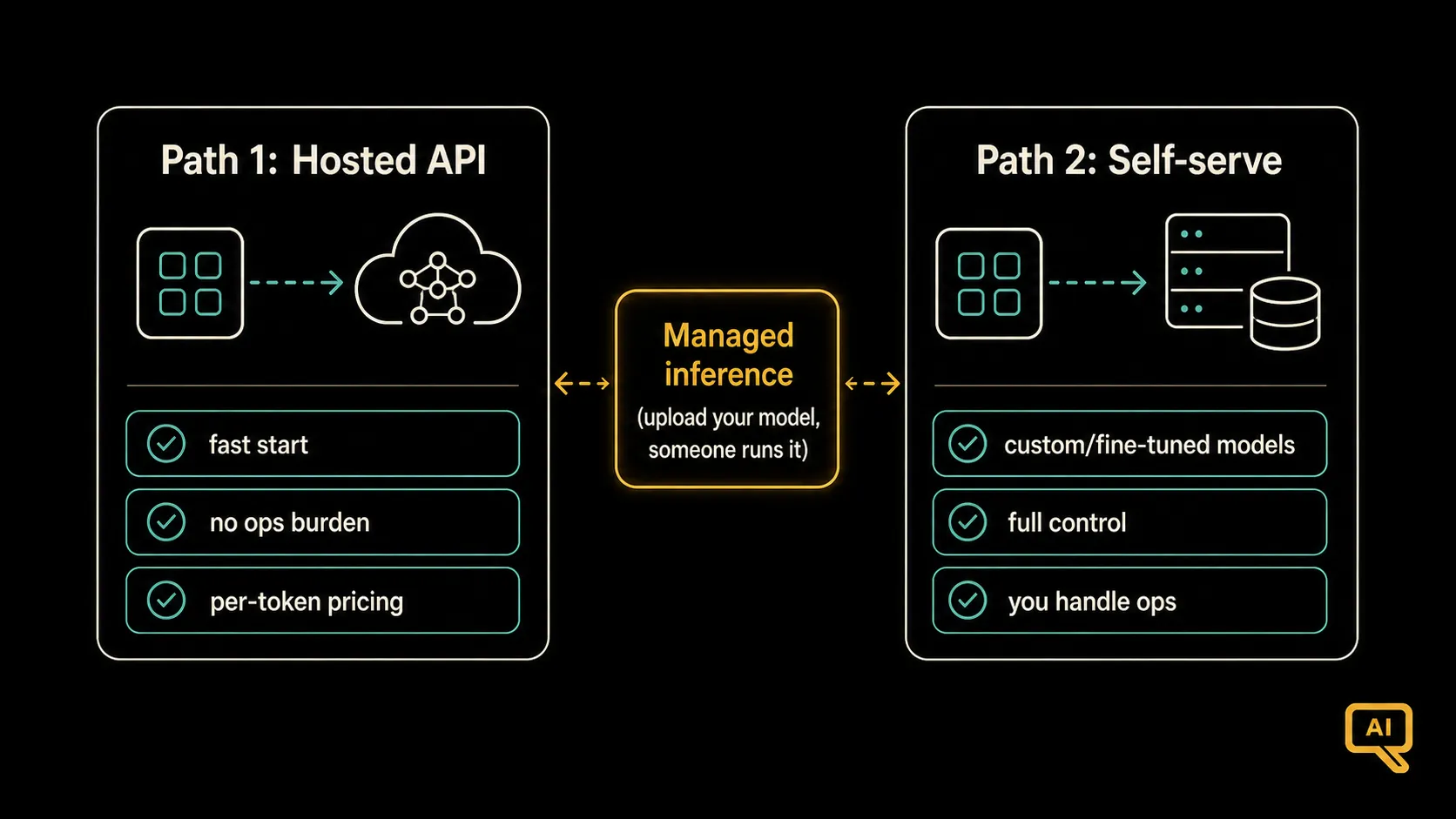 Figure 1: You can either call a hosted model through someone else’s API, or serve your own model on your own infrastructure. Each path solves the same problem in very different ways, with very different trade-offs.
Path 1: Call a hosted model by API. You point your code at someone else’s endpoint (an API from a big model provider, or a cloud platform’s hosted-model service), send it prompts, and get responses back. The heavy lifting of running the model happens on their infrastructure. This is by far the most common way people get started, and for many use cases it’s also where they stay.
Path 2: Serve the model yourself. You take a model, often an open one you’ve fine-tuned (like the LoRA adapter we built in article 5), and run it on your own infrastructure. That means picking hardware, running a serving stack, handling scaling, and looking after uptime. You get more control, but more responsibility.
Which one is right depends on your situation, and honestly, the honest answer for most people, most of the time, is start with a hosted API and only move off it when you have a concrete reason. Let me walk through why, and when to actually make that move.
When to just use a hosted API
For most projects, especially early on, calling a hosted model is the right call. Reasons it’s usually the sensible default:
- You start immediately. No infrastructure to set up, no hardware to size, no serving stack to learn. Sign up, get a key, make requests.
- The provider handles the ops. Uptime, scaling, hardware failures, model updates: not your problem.
- You get access to the best models. Frontier proprietary models are only available through APIs, and they’re often meaningfully better than what you could self-serve at the same price point.
- You pay for what you use. No idle GPU costs. Low traffic means low cost.
- You can switch relatively easily. Most APIs are similar enough that swapping providers, or between hosted and self-served, isn’t the epic migration people fear.
The trade-offs are real but often overstated:
- Cost at high volume can bite. Per-token pricing is great at low volume and can get uncomfortable at very high volume. Watch it.
- You’re subject to the provider’s policies, uptime, and model changes. If they update the model or their terms, you deal with it.
- Data goes to a third party. For most business use cases this is fine (with appropriate enterprise agreements), but some regulated domains can’t allow it.
- You can only serve what’s offered. If you’ve fine-tuned your own open model, most hosted APIs won’t run it for you directly (though some now support hosting custom LoRA adapters, which is a middle ground worth watching).
When self-serving makes sense
The reasonable reasons to self-serve, in rough order of how compelling they are:
- You’ve fine-tuned your own open model and need to actually run it. This is one of the honest cases. If you did the work in articles 4 and 5, self-serving is often the natural next step.
- You have strict data-residency or privacy requirements that hosted APIs can’t meet.
- Your volume is high enough that per-token pricing becomes worse than the amortised cost of your own hardware. This usually only kicks in at meaningful scale.
- You need low-latency, close-to-the-user inference in ways an external API can’t provide.
The things you take on when you self-serve, in exchange:
- Hardware. GPUs (typically a few different tiers depending on model size), memory, storage, networking.
- A serving stack that actually runs the model efficiently. Naive inference is often 5–10x slower than a good serving library because these tools batch requests, keep memory laid out well, and use tricks that squeeze real speed out of the hardware. Common names to know: vLLM, TGI (Text Generation Inference), TensorRT-LLM. You don’t need to master any of them today; just recognise that a proper serving stack is the difference between “it works in a demo” and “it holds up in production.”
- Operations. Uptime monitoring, scaling, deployments, hardware failure handling. If your organisation already runs production services, you have the muscle for this. If not, you’re building it.
A useful middle-ground worth naming: managed inference services that let you upload your own model (or LoRA adapter) and have someone else run it for you. This gives you the “run my custom model” benefit without the “manage my own GPUs” cost. If you fine-tuned an open model but don’t want to be a serving-infrastructure team, this is often the sweetest spot.
The dials that matter regardless of path
Whether you use a hosted API or self-serve, there are a handful of operational concerns that always show up. Figure 2 gathers them.
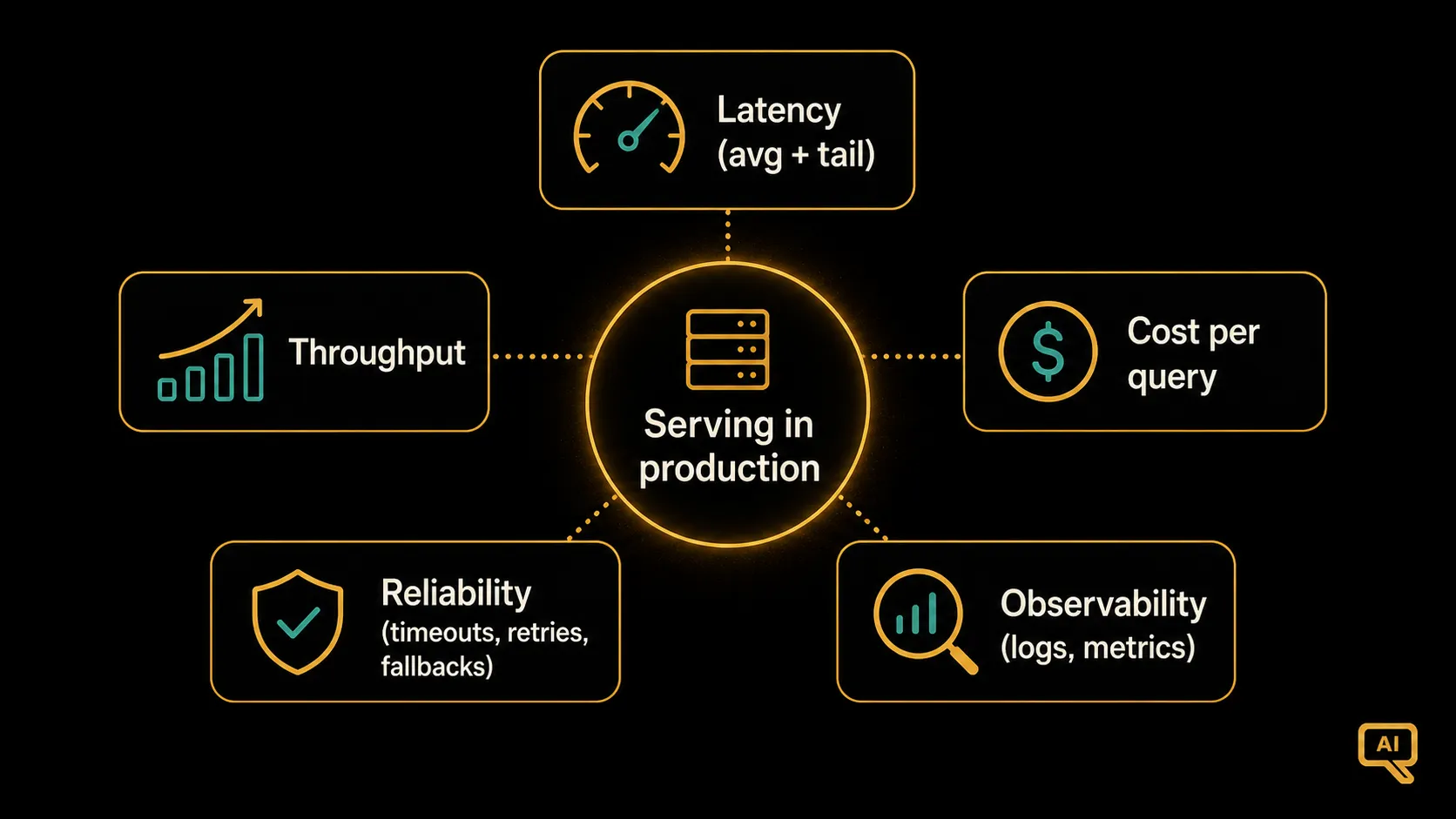 Figure 2: Whichever path you pick, five concerns matter for serving in production: latency (both average and how it feels), throughput (how many queries you can handle), cost per query, reliability (retries and fallbacks), and observability (knowing what happened when something went wrong).
Let me quickly say what to actually do about each.
Latency. LLMs are slow compared to most software. One of the biggest UX improvements you can make is streaming: send the response tokens back to the user as they’re generated, rather than making them wait for the whole answer. It doesn’t make the model faster, but it changes how fast it feels. Beyond that, watch your worst case (the slow 5% of queries) alongside your average, because the slow tail is what actually hurts users.
Throughput. How many queries can you handle at once? If you’re using a hosted API, throughput is mostly the provider’s problem, though you’ll bump into rate limits at scale. If you’re self-serving, throughput is where the choice of serving stack matters most: modern stacks batch multiple requests together so the GPU stays busy, which can multiply your effective throughput several times over. Don’t try to build this yourself.
Cost per query. Measure this from day one. Not just “how much did we spend last month” but “how much does each query cost, on average and at the worst case.” That number is what you optimise against, and it’s what tells you whether a change actually saved money or just moved it around. We’ll come back to cost specifically in the final article of this track.
Reliability. APIs fail sometimes. Hardware fails sometimes. Your system needs a plan. Timeouts on every call. Retries with a small backoff for transient errors. A fallback path when the primary model is unavailable (a cached response, a simpler prompt, or a smaller model). None of this is exotic; all of it is essential.
Observability. When something goes wrong, you need to be able to see what happened. Log the inputs, the outputs, the timing, the cost, the retries, and any errors. Not necessarily the content of every response if you have privacy concerns, but enough metadata to diagnose problems. This is the ground truth your monitoring (article 10) and evaluation (article 11) build on.
The concrete first-day setup
If you were starting from zero today with a real project, here’s the setup I’d honestly recommend, and it’s simpler than you might guess.
- Pick a hosted API to start. Get the fastest possible working end-to-end path from user input to model response.
- Add streaming for the response, so users see output start almost immediately.
- Add basic reliability: timeouts on every model call, one retry on transient errors, an error path that returns a graceful message rather than crashing.
- Log every call, including the prompt template version, the tokens used, and the time taken. This is your foundation for monitoring and evaluation later.
- Track cost per query and average latency in whatever dashboard you already use.
- Only later, when you have a real reason (a fine-tuned model to serve, a data-residency requirement, or a compelling cost case), consider moving to self-hosting.
That handful of steps is enough for a real production LLM system. Nothing exotic, and it puts you in a strong position to add more sophistication as needed.
Serving is where the theory meets the traffic
Deploying a language model isn’t the glamorous part of the field. It’s the plumbing. But it’s also where “we built something interesting” turns into “people are actually using it,” and where the operational habits from the rest of this track start earning their keep in the real world. Get the serving right, and every other LLMOps discipline has a solid foundation to sit on.
The next article picks up right at the “we’re serving traffic, now what” moment. Once your system is live and users are hitting it, how do you know it’s still working well? How do you catch a quality drop, a cost spike, or a subtle behaviour change from a provider update? That’s monitoring, and it’s up next.
Next in the series: Monitoring LLMs: Cost, Latency, Drift & Quality, watching a live system that can degrade silently.