
Monitoring, from the last article, tells you how your system is doing right now. That’s essential. But it can’t answer a different, equally important question: if I change something, will it help or hurt? And “just push the change and watch the dashboard” is a bad way to answer that, because by the time you see a problem, you’ve already shipped it to users. What you need is a way to check changes before they go live.
That’s what this article is about. Evaluation pipelines are the pre-production companion to monitoring: automated regression testing for LLM systems, run against a stable set of test cases you trust. It sounds heavier than it is. Done right, it’s one of the habits that keeps LLM applications from breaking silently over time.
Why LLMs need this more than most software
Traditional software has decades of regression testing wisdom behind it: unit tests, integration tests, CI pipelines that block a merge if a test breaks. LLM systems need the same thing, but with a twist that makes the standard tools not quite fit.
Two things make LLM regression testing distinctive.
First, LLM outputs are open-ended text, not simple values. You can’t just check output == expected, because there are usually many valid outputs and the model may produce a slightly different one every time. You need looser but still meaningful checks.
Second, changes come from more places than in traditional software. Your code changes. Your prompts change. Your retrieval changes. Your model can be updated by its provider. Any of these can shift behaviour, and you’d like your pipeline to catch a regression from any of them, not just from a code change.
Together, these mean you want a testing setup that runs the whole system end-to-end on a stable set of realistic inputs, and scores the outputs in ways that catch real quality changes without demanding exact matches. That’s an evaluation pipeline.
The golden test set: your stable reference
At the heart of every good evaluation pipeline is a golden test set: a curated collection of inputs, ideally with reference answers or clear grading criteria, that you keep stable across changes. It’s the anchor. When you change something and run your evaluation, you’re really asking: did the golden set do better, worse, or the same as before?
The word “golden” isn’t just marketing. It means these examples are trusted, deliberate, and worth protecting from casual editing. Randomly reshuffling your test set every week defeats the whole point, because you lose the ability to compare runs. Add cases carefully, remove them rarely, and version the set so you know which version was used for which comparison. Figure 1 shows what a good golden set contains.
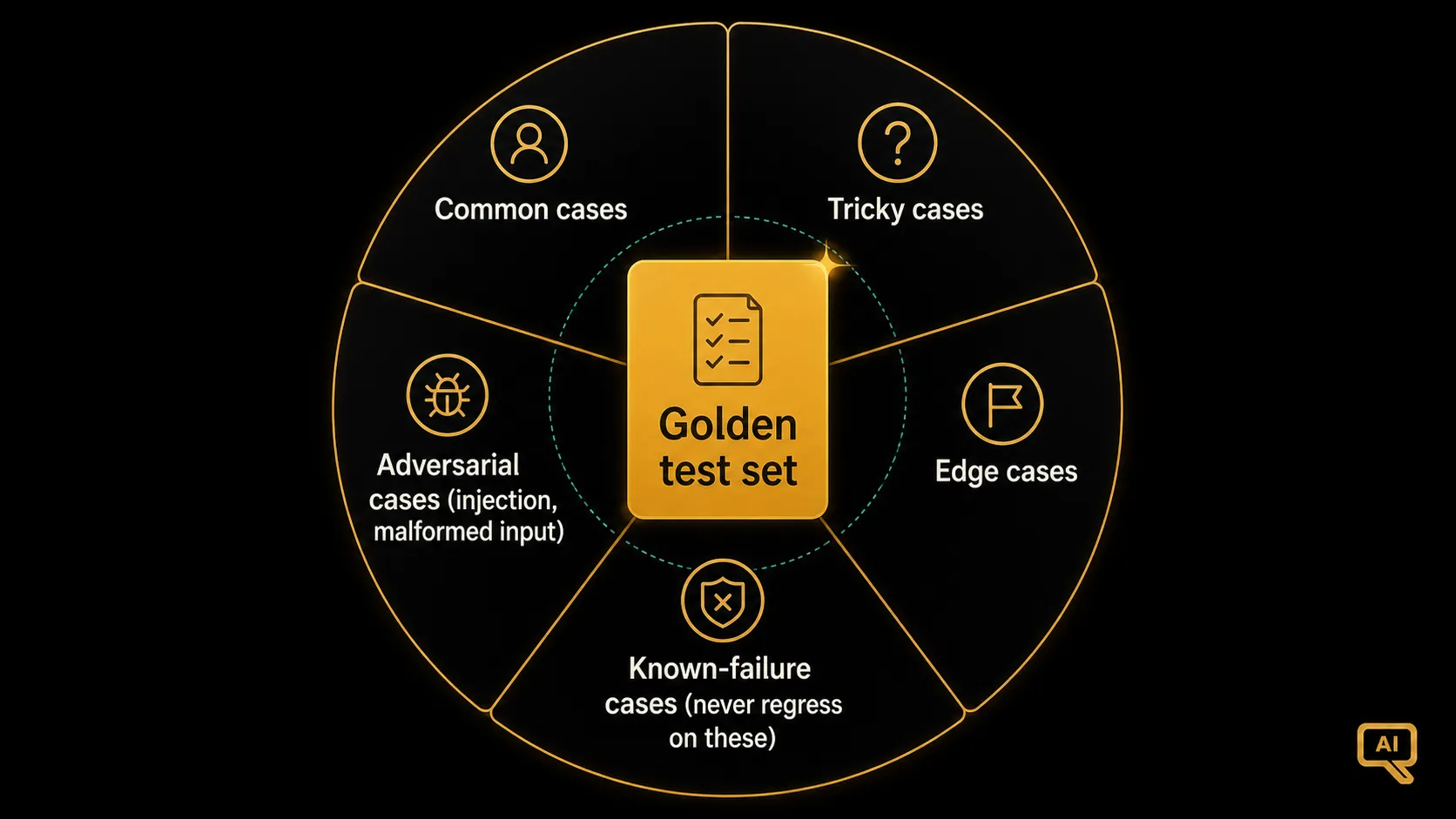 Figure 1: A well-curated golden test set covers common cases, tricky cases, edge cases, known-failure cases (things that broke before, so you can never regress on them again), and adversarial cases (attempts at prompt injection or malformed input). Together they’re a representative slice of what production will actually throw at you.
A good set isn’t just a list of easy questions. It deliberately spans:
- Common cases the system should always nail. This is the majority of the set.
- Tricky cases: ambiguous, compound, or awkward inputs. The kind of thing where a lazy version of your system fails.
- Edge cases: unusual inputs, very short or very long, unusual formats.
- Known-failure cases: any input you’ve seen fail badly in the past. Once it’s on the list, it stays on the list, so you can never quietly regress on it again. This is one of the most valuable habits in the whole discipline.
- Adversarial cases: attempts at prompt injection, malformed data, gibberish. Testing that your guardrails actually work.
For most projects, 50 to a couple hundred well-chosen cases is a great starting point. Fewer than that and coverage is thin; more than that and it becomes a maintenance burden. As with a lot of engineering, the fifty carefully-chosen examples are usually worth more than five hundred sloppy ones.
How to actually grade LLM outputs
Given a test set, how do you decide if an output is good? Three practical approaches, from lightest to heaviest, and you’ll usually use all of them together.
Automated checks for objective things. Any check that can be scripted, script it. Did the output parse as valid JSON? Does it contain the expected fields? Does it match a required format? Does it stay under a length limit? Does it cite a source when it should? These checks are cheap, fast, and catch a lot of regressions without any human effort.
Model-as-judge for subtler quality. For qualities like helpfulness, tone, or faithfulness (things that don’t cleanly script), you can ask a capable model to score each output against a rubric you write. This is the same trick we met in the RAG evaluation article. It scales well and is useful, but with two caveats worth remembering: pin the grading prompt and grading model as part of your test set version (a different grader will give different scores), and periodically spot-check the model’s judgements against yours to make sure they still agree.
Human review for the truly fuzzy stuff. For the subtlest judgements, and for periodic ground-truthing of your model-as-judge scores, there’s no substitute for a human reading a sample of outputs. It’s not something you do on every change, but a small sample every week is what keeps your grading honest.
Most real systems layer all three: automated checks on every change (fast, cheap, catches lots of regressions), model-graded scores on a broader sweep (catches subtler shifts), and a periodic human sample (catches things the others miss and calibrates the model-grader).
The pipeline itself
Now the actual “pipeline” part: running this evaluation automatically on every change to your system. Figure 2 shows the shape.
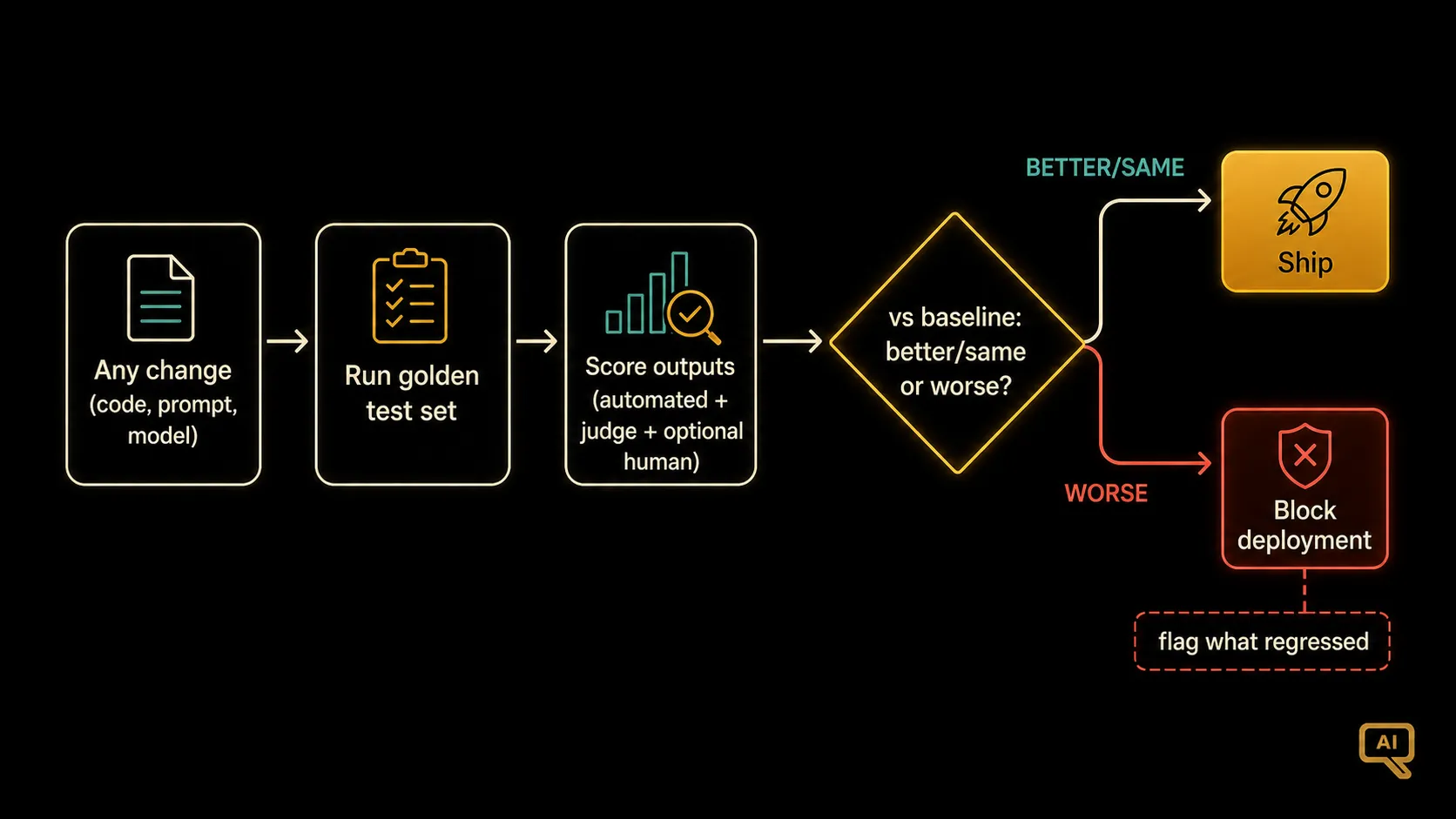 Figure 2: Any change (code, prompt, model version) triggers the pipeline: run the golden test set through the new configuration, score results, compare to the last known good baseline, block the deployment if regression is detected. The pipeline runs the same test set for every change, so results are comparable.
Reading it: any change to the system, whether a code change, a prompt update, a model version bump, or a config tweak, kicks off the pipeline. The pipeline runs the whole golden set through the new configuration, scores every output, and compares the scores to the last known-good baseline. If the scores clearly improved (or stayed steady), the change can proceed. If they clearly regressed, the pipeline blocks the deployment and flags what regressed. In pseudocode:
def evaluate_change(new_config):
    scores = {"automated": [], "judge": []}
    for case in golden_test_set:
        output = run_system(new_config, case.input)
        scores["automated"].append(run_automated_checks(output, case))
        scores["judge"].append(model_grade(output, case))
    summary = summarise(scores)
    baseline = load_baseline()
    if regression_detected(summary, baseline):
        return "BLOCK", diff(summary, baseline)
    return "PASS", summary
That’s the essence. In practice this ends up hooked into your CI system (the same one that runs your regular tests), so it triggers automatically. You don’t have to remember to run it; it just happens. Every change, every time.
A subtle but important detail: update the baseline when a change legitimately improves things. Otherwise “better than baseline” gradually stops meaning “better than what we had last week” and starts meaning “better than what we had a year ago,” which isn’t as useful. Treat the baseline as a live artefact.
What “regression” actually means for LLMs
Because LLM outputs are stochastic and grading is fuzzy, “regression” is a slightly softer concept than in traditional software. You’re rarely looking at “test 47 broke”; more often it’s “the aggregate quality score on this set dropped by 3 points, and the drop concentrated in these five cases.” Which means your pipeline needs to define what a “significant” regression means. A useful rule of thumb: define both a numerical threshold (aggregate score drop above X) and a case-level threshold (any case previously passing now failing, especially any known-failure case). Together they catch broad quality drift and specific breakages.
Why this changes how a team works
The under-appreciated benefit of a proper evaluation pipeline isn’t just catching regressions. It’s changing the culture around changes. When every prompt tweak or model change gets an honest score, the team stops arguing about whose gut feel is right and starts looking at the numbers. Debates about “does this new prompt work better?” resolve in an hour instead of a week. Improvements you can see become the currency, replacing improvements you feel. That’s the deeper cultural win, and it compounds over time.
The complete quality picture
Pause and look at what we now have. Evaluation pipelines (this article) catch regressions before they hit users. Monitoring (article 10) catches problems once they’re live. Together, they’re the two halves of the quality picture, and neither one is enough on its own. Pre-production catches what you can predict; production catches what you couldn’t. Both, working together, are what keep a serious LLM system reliably good over time.
But there’s a specific class of things neither the evaluation pipeline nor monitoring catches gracefully by itself: the unsafe or undesired outputs that would slip through even a well-graded response. Malicious content, sensitive information leaks, prompt injection payloads. Those need something more like guardrails, sitting live in the request path. That’s next.
Next in the series: Guardrails & Safety Layers, live protection against unsafe inputs and outputs.