
Here’s a fact that surprised me when I first really sat with it: a computer cannot read. Not a single word. Everything a machine does, all the maths and all the “learning”, happens on numbers. So before a machine can do anything clever with language, we have to perform a small act of translation: turn words into numbers.
This sounds trivial. It is not. How you turn words into numbers shapes everything the machine can and can’t understand afterwards. This article walks through the earliest, simplest ways of doing it, methods that are still useful today, and whose limitations set up the stronger ideas coming later.
The naive first idea: give every word a number
The most obvious approach is to make a big list of every word we know and assign each one a number. “Apple” is 1, “banana” is 2, “cat” is 3, and so on.
It’s simple, but it hides a nasty trap. If “cat” is 3 and “dog” is 300, the machine might assume dog is somehow a hundred times bigger than cat, or that they’re far apart, or that word number 150 sits neatly “between” them in meaning. None of that is true. The numbers were assigned in alphabetical order, not by meaning. We’ve accidentally invented relationships that don’t exist.
So plain numbering won’t do. We need a way to represent words that doesn’t smuggle in fake relationships. That’s where our first real technique comes in.
One-hot encoding: every word stands alone
The fix is called one-hot encoding, and the idea is charmingly stubborn: give every word its own private slot, and refuse to imply any relationship between them at all.
Picture a long row of switches, one switch per word in our vocabulary. To represent a word, we flip its switch on (a 1) and leave every other switch off (a 0). That single “hot” switch is why it’s called one-hot. Figure 1 shows this for a tiny four-word vocabulary.
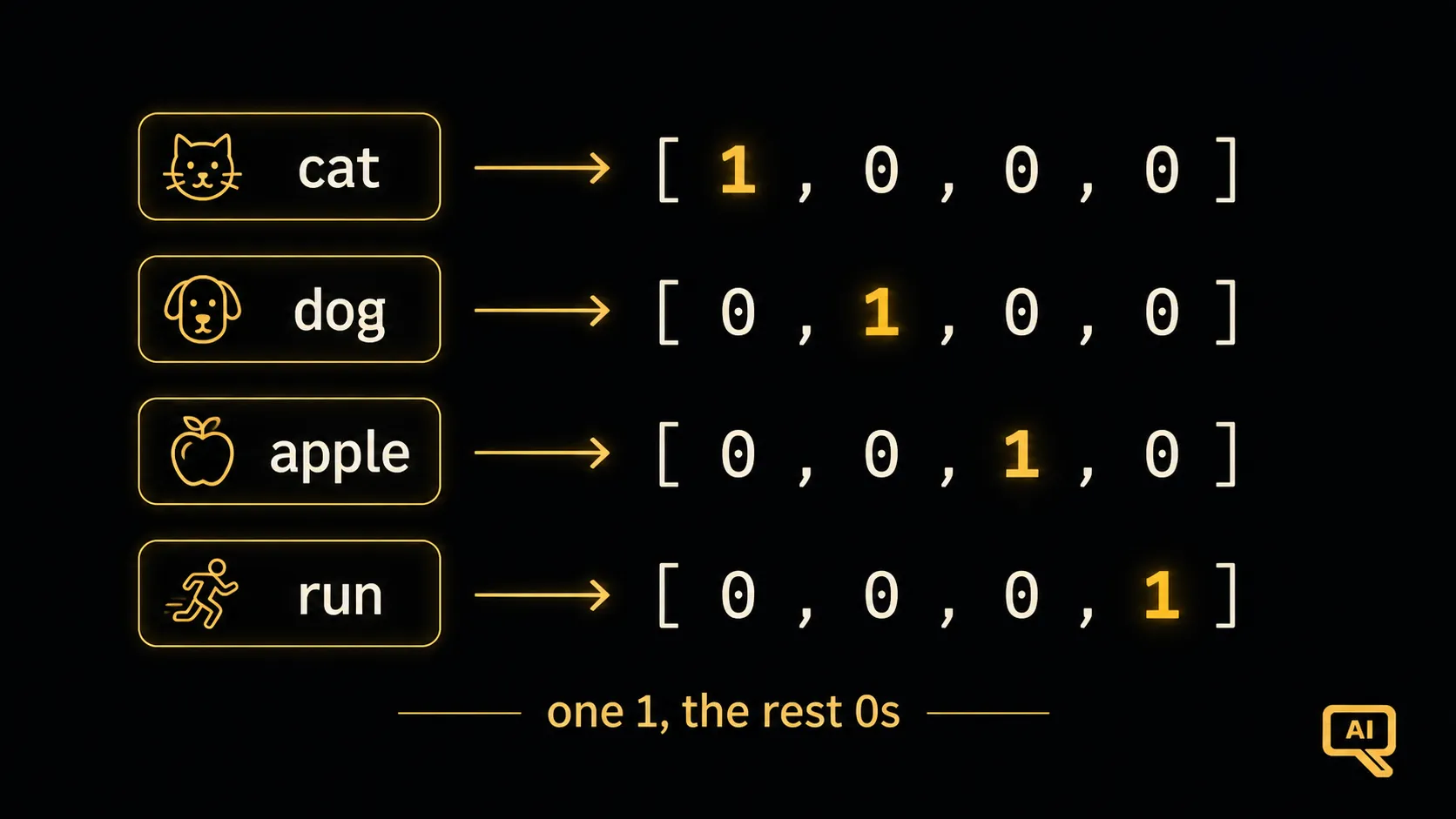 Figure 1: With a vocabulary of four words, each word becomes a row of four slots: a single 1 in its own position and 0s everywhere else. No word’s number is “bigger” or “closer” than another’s.
In code, it’s just this:
vocabulary = ["cat", "dog", "apple", "run"]

def one_hot(word):
    return [1 if w == word else 0 for w in vocabulary]

print(one_hot("cat"))    # [1, 0, 0, 0]
print(one_hot("apple"))  # [0, 0, 1, 0]
Notice what we’ve achieved: “cat” and “dog” are now equal citizens. Neither is bigger. Neither is closer to “apple.” Every word is exactly as different from every other word, which is honest, because we haven’t taught the machine any meaning yet.
From words to whole sentences: bag-of-words
One-hot handles single words, but we usually care about whole sentences. The classic next step is the bag-of-words approach, and the name is a perfect description: imagine tipping all the words of a sentence into a bag, shaking it, and just counting how many of each word you have. Order is thrown away; only the counts remain.
To represent a sentence, we make one slot per vocabulary word and fill in how many times that word appears. Figure 2 shows two short sentences turned into count vectors.
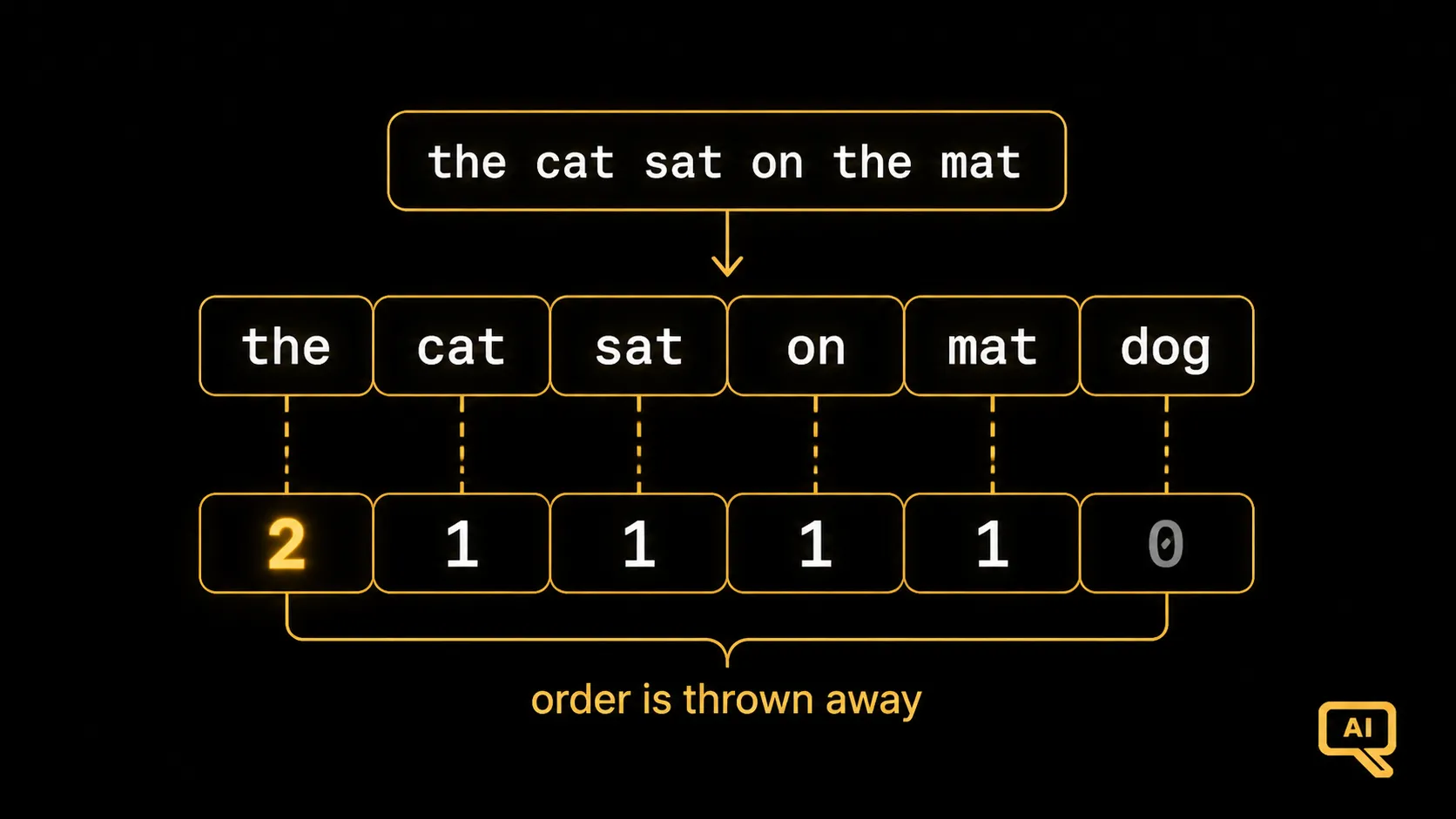 Figure 2: Each sentence becomes a row of word counts across the whole vocabulary. “The cat sat on the mat” puts a 2 in the slot for “the” and a 1 in the slots for “cat,” “sat,” “mat.” Word order is discarded entirely.
Here it is in a few lines:
vocabulary = ["the", "cat", "sat", "on", "mat", "dog"]

def bag_of_words(sentence):
    words = sentence.lower().split()
    return [words.count(w) for w in vocabulary]

print(bag_of_words("the cat sat on the mat"))
# [2, 1, 1, 1, 1, 0]   -> "the" appears twice, "dog" not at all
Now a whole sentence is a row of numbers a machine can compare and learn from. Bag-of-words is useful: it powered spam filters and document sorting for years, and still does a decent job on simple tasks. If two documents have similar word counts, they’re probably about similar things.
Where these simple methods run out of road
These techniques are clever and they got us a long way, but they share two deep flaws that no amount of tweaking can fix. Understanding those flaws is the reason the next article exists.
First, they don’t capture meaning. In one-hot and bag-of-words, “big” and “large” are as unrelated as “big” and “banana.” The machine has no idea that “cat” and “kitten” are cousins while “cat” and “helicopter” are strangers. Every word is an island. That’s honest, but it’s also a dead end. Real understanding needs the machine to know which words are related.
Second, they throw away order. Bag-of-words forgets that “dog bites man” and “man bites dog” are different. Shaking the words into a bag loses the very structure that carries the meaning.
And there’s a practical headache too: real vocabularies have tens of thousands of words, so these vectors become enormously long rows that are almost entirely zeros. That is wasteful and clumsy.
So we’re left with a clear wish-list. We want a way to represent words that (a) captures meaning, so related words look related, and (b) is compact rather than a sea of zeros. That wish-list describes word embeddings, and that’s where we go next.
Next in the series: Word Embeddings & Vector Space: how machines start to capture what words mean.