
We’ve spent seven articles building the mental model. You know what an agent is (a model that decides, acts, and observes in a loop), you know how the loop runs, you know what tools and memory and planning bring to the table. Now we’re going to do the thing that makes all of it click into place: we’re going to build one.
I want to be honest about why this matters. For a long time I treated agents as a kind of magic box. You install a framework, you call some function with a scary name, an agent “happens,” and you’re never quite sure what went on inside. That feeling of mystery is the enemy of good engineering. So in this article we’re going to throw the frameworks away and build an agent from scratch, in plain Python, using nothing but a model API and a while loop. It’s shorter than you’d expect. By the end you’ll see that an agent is not a magic box at all, it’s about forty lines of code you could have written yourself.
What we’re building
Let’s keep the goal small and concrete. We’ll build an agent that can answer questions requiring a bit of work: things like “What’s 4,318 times 27, and is that more than the number of days in twelve years?” A plain model would fumble the arithmetic. Our agent will have two tools, a calculator and a small lookup function, and it’ll decide on its own when to reach for each one.
Two tools is enough to see everything important. The loop that handles two tools is exactly the loop that handles two hundred.
The four pieces
Every agent, no matter how fancy, is built from the same four pieces. Keep these in mind and nothing will surprise you.
First, a system prompt that tells the model it’s an agent, describes its tools, and explains the loop it’s in. Second, a set of tool functions, ordinary Python functions that do real work. Third, a message list that grows as the conversation unfolds, holding the running history of what’s been said and done. Fourth, the loop itself, which calls the model, checks whether it asked to use a tool, runs the tool if so, appends the result, and goes around again.
That’s it. Everything else is decoration.
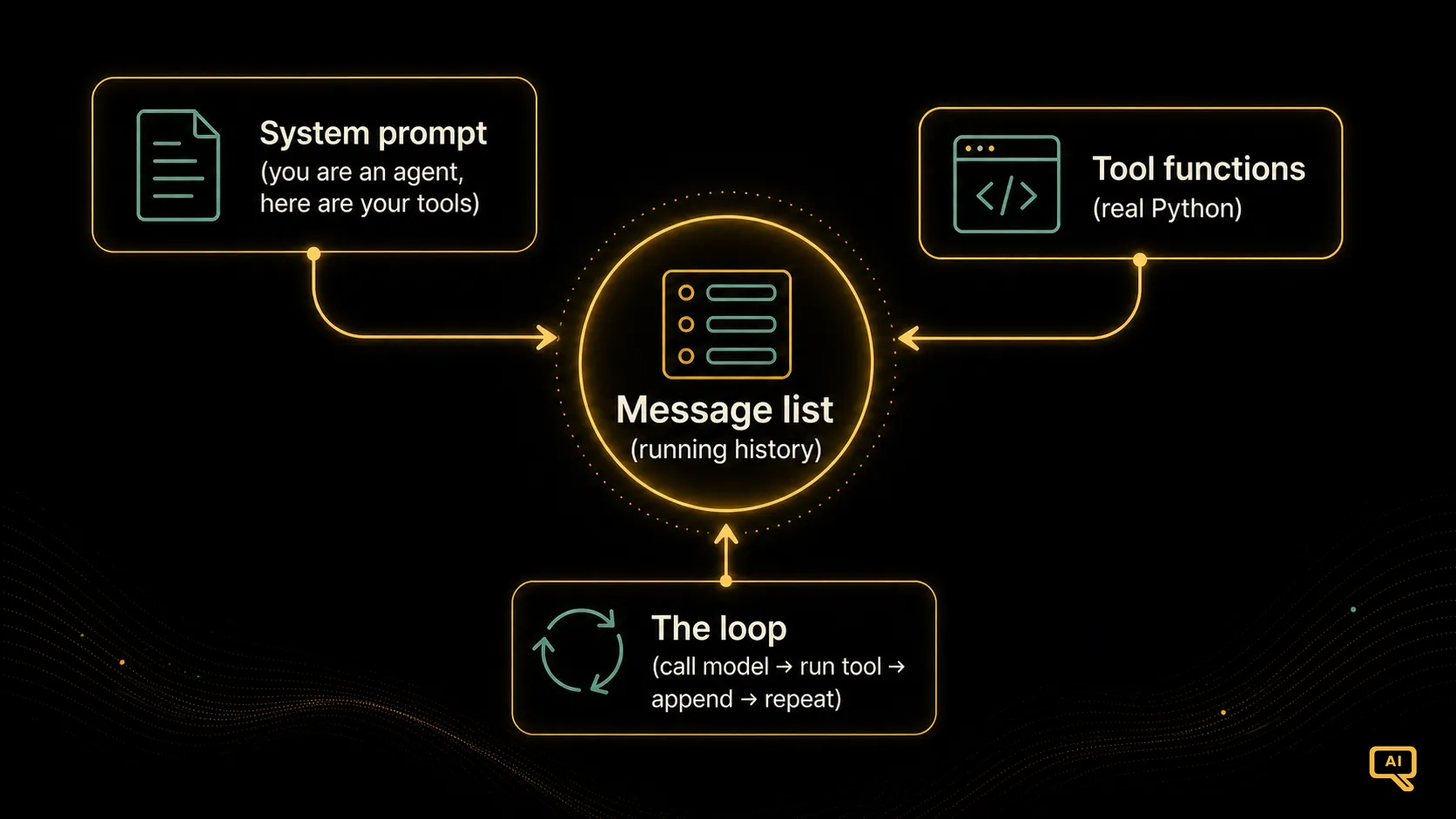 Figure 1: The four pieces of an agent and how the loop connects them. The message list is the thread that ties every turn together.
Figure 1 shows how these pieces fit. Notice that the message list sits at the centre. It’s the memory of the loop, the thing that lets turn five know what happened in turn two.
The tools
Let’s write the tools first, because they’re the easy part. They’re just functions.
def calculator(expression: str) -> str:
    """Evaluate a simple arithmetic expression."""
    try:
        # A real system would use a safe parser, not eval.
        result = eval(expression, {"__builtins__": {}}, {})
        return str(result)
    except Exception as e:
        return f"Error: {e}"

def days_in_years(years: int) -> str:
    """Return the number of days in a given number of years."""
    return str(years * 365)
Nothing agentic here yet. These are the kinds of functions you’d write on any ordinary Tuesday. The magic isn’t in the tools, it’s in letting the model choose them.
Next we describe these tools to the model in the structured format its API expects. This is the “function calling” schema we covered back in article 4. Each description says the tool’s name, what it does, and what arguments it takes.
tools = [
    {
        "name": "calculator",
        "description": "Evaluate an arithmetic expression like '4318 * 27'.",
        "input_schema": {
            "type": "object",
            "properties": {
                "expression": {"type": "string"}
            },
            "required": ["expression"],
        },
    },
    {
        "name": "days_in_years",
        "description": "Get the number of days in a whole number of years.",
        "input_schema": {
            "type": "object",
            "properties": {
                "years": {"type": "integer"}
            },
            "required": ["years"],
        },
    },
]
Remember the lesson from article 4: these descriptions are the highest-leverage thing you’ll write. The model picks tools based entirely on what you say here, so clear, specific descriptions do more for reliability than almost anything else.
The loop
Now the heart of it. Here’s the whole agent, and I’ll walk through it line by line afterwards.
def run_agent(user_question: str) -> str:
    messages = [{"role": "user", "content": user_question}]

    while True:
        response = model.create(
            system="You are a helpful agent. Use the tools when a task "
                   "needs calculation or a lookup. When you have the final "
                   "answer, just state it in plain language.",
            messages=messages,
            tools=tools,
        )

        # Did the model ask to use a tool?
        tool_calls = [b for b in response.content if b.type == "tool_use"]

        if not tool_calls:
            # No tool requested, so this is the final answer.
            return response.text

        # Otherwise, run each requested tool and feed results back.
        messages.append({"role": "assistant", "content": response.content})
        results = []
        for call in tool_calls:
            fn = {"calculator": calculator,
                  "days_in_years": days_in_years}[call.name]
            output = fn(**call.input)
            results.append({
                "type": "tool_result",
                "tool_use_id": call.id,
                "content": output,
            })
        messages.append({"role": "user", "content": results})
        # Loop back around with the results now in the history.
Read it slowly. The structure is almost embarrassingly simple.
We start the message list with the user’s question. Then we enter the loop. We call the model, handing it the full history and the tool descriptions. We look at what came back. If the model didn’t ask for a tool, it’s done thinking, so we return its answer and stop. If it did ask for one or more tools, we run each one, package up the results, append them to the history, and go around again. The model sees its own tool results on the next pass and decides what to do with them.
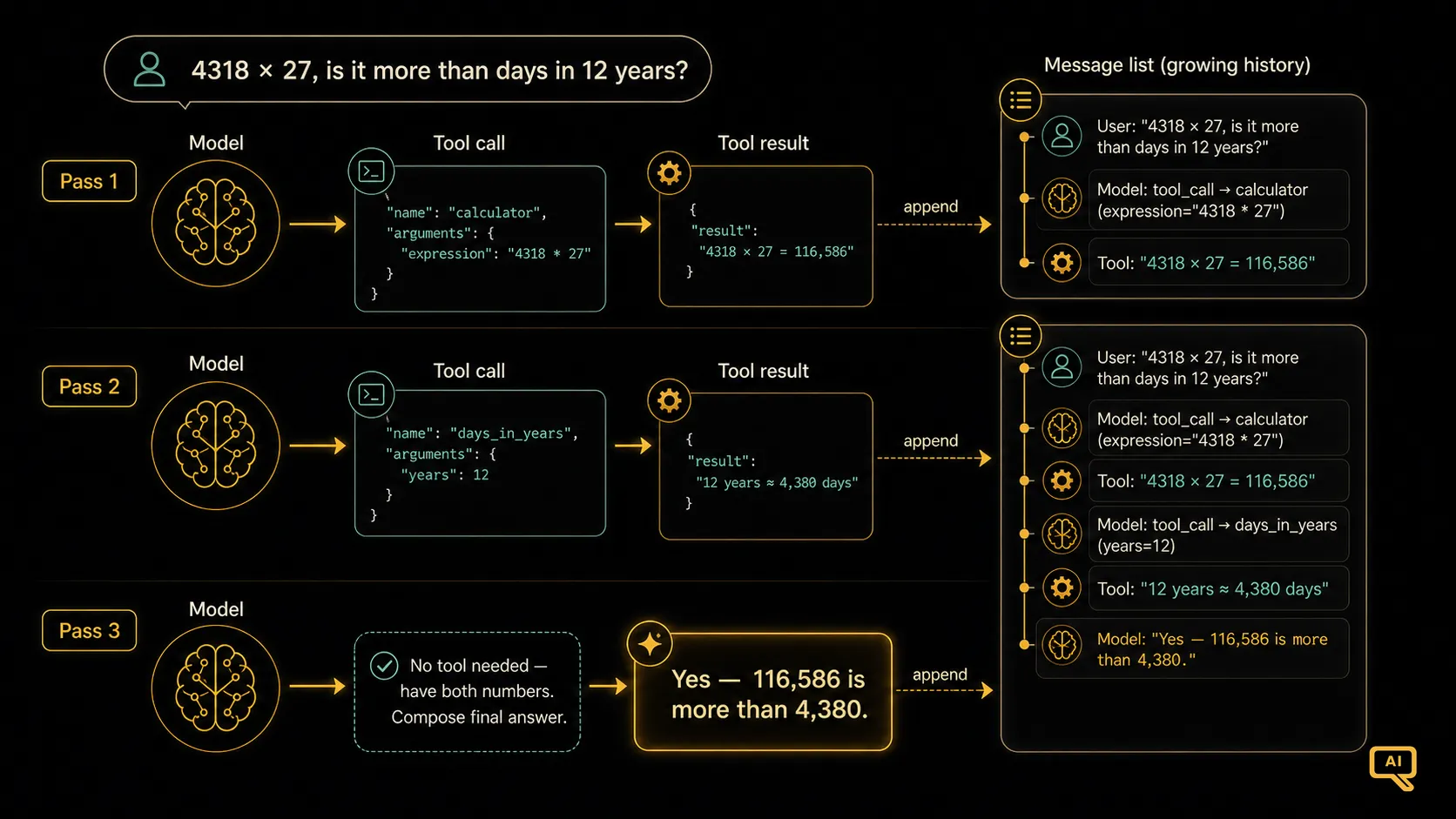 Figure 2: How the message list grows across three passes as the agent solves a two-step question. Each pass adds the model’s request and the tool’s answer.
Figure 2 traces a real run. Pass one: the model asks for the calculator. Pass two: it sees the product, then asks for the days lookup so it can compare. Pass three: it has both numbers, needs no more tools, and writes the plain-language answer. Three trips around the same tiny loop, and a question that no single model call could have handled cleanly gets solved.
The stopping condition, and why it matters
Notice what actually ends the loop: the model choosing not to call a tool. That’s the natural exit. When the model has everything it needs, it stops asking for tools and just answers, and our if not tool_calls check catches that and returns.
This is elegant, but it’s also a trap if you’re not careful. A confused model can loop forever, calling tools, getting results, calling more tools, never deciding it’s finished. That’s why article 3 hammered on stopping conditions. In real code you’d never write while True. You’d write for step in range(max_steps) with a sensible cap, maybe ten or twenty, and return a graceful “I couldn’t complete this” message if the cap is hit. A loop without a leash is a bug waiting to happen.
What you just learned
Step back and notice what’s not in this code. There’s no framework. There’s no orchestration engine, no graph, no mysterious Agent class. There’s a system prompt, two functions, a growing list, and a loop. That’s the entire skeleton of every agent you’ll ever meet, from a weekend toy to a production system handling thousands of requests.
When you pick up a framework in a couple of articles’ time, this is what it’s doing under the hood. Frameworks add retries, logging, streaming, state management, and a hundred conveniences, and those conveniences are genuinely worth having. But they don’t change the shape. The shape is this loop. Once you can see the loop inside the framework, you’ll debug ten times faster, because you’ll always know what’s supposed to be happening.
In the next article we take a natural step up. One agent with a loop is powerful, but some problems are big enough that a single agent gets overwhelmed. That’s where multi-agent systems come in, several agents working together, each with a narrower job. We’ll look at when that’s genuinely worth the added complexity, and when it’s just complexity for its own sake.