
The single capability that separates a real agent from a very clever chatbot is tool use. This is what turns the model from a text generator into something that can act on the world. Everything else in the agent loop, memory, planning, all of it, exists in service of using tools well. So if there’s one article in this track worth internalising deeply, this is it.
Fortunately, tool use is a lot less mysterious than it sounds. Under the hood, it’s just a specific, well-designed way for the model to ask “please run this function for me and tell me the result,” and for your code to actually run it. But the design details matter a great deal, and getting them right (or wrong) is often the difference between an agent that works reliably and one that limps.
The core idea, in one paragraph
A tool is any function your code makes available for the model to call. It could be a search API, a database query, a calculator, a file writer, a step in another workflow. From the model’s point of view, each tool has a name, a description of what it does, a schema of what inputs it takes, and (implicitly) some output it returns.
When the agent is running its loop, the model doesn’t call the tool directly. Instead, it produces a structured request that says “I want to call this tool with these arguments.” Your code, sitting around the model, sees this request, actually runs the tool, and hands the result back to the model as an observation. Then the loop continues. Figure 1 shows this handoff.
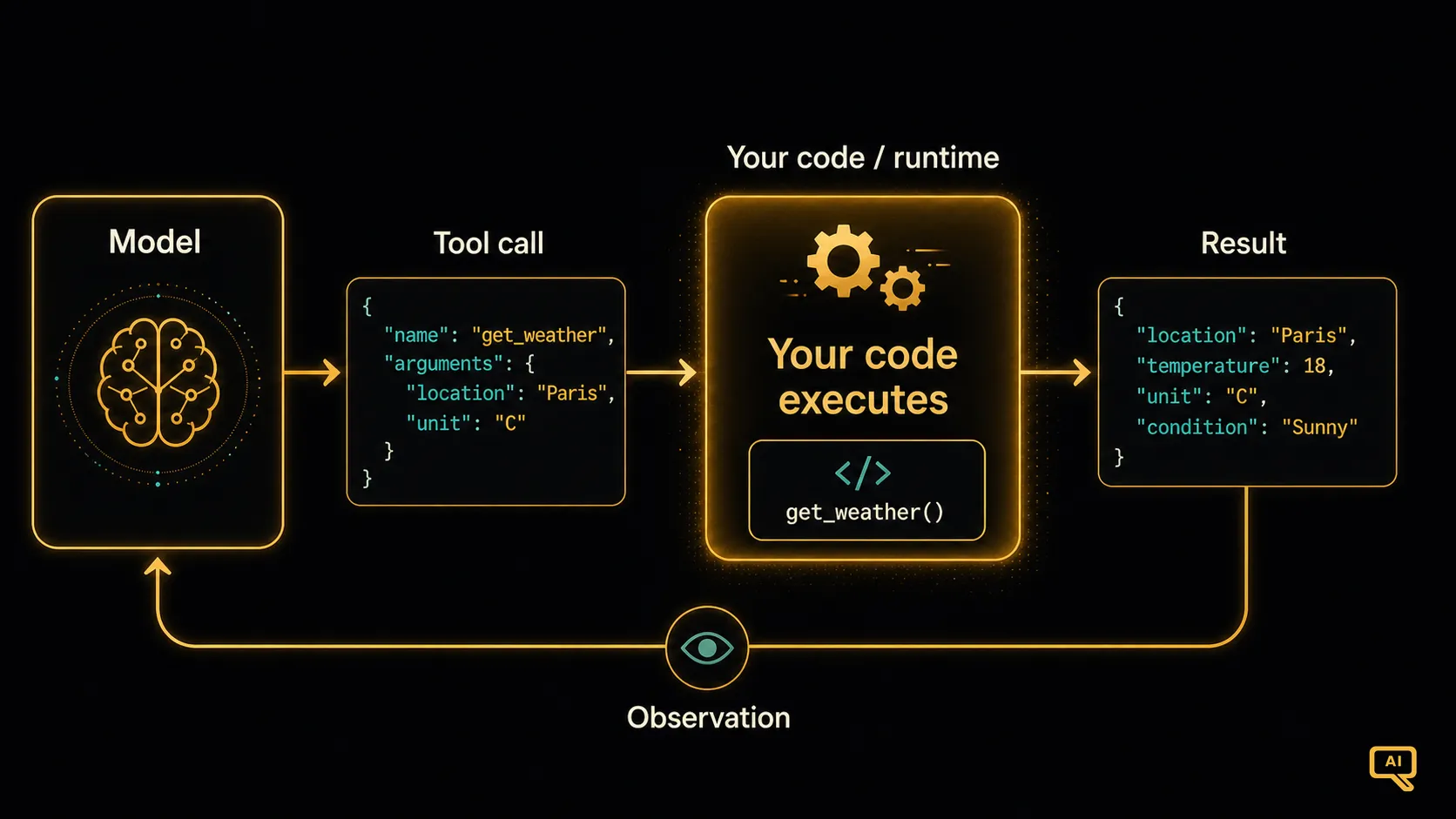 Figure 1: The model doesn’t run tools itself. It produces a structured tool call, your code executes the tool, and the result comes back as an observation the model can reason about. This clean separation is what makes tool use safe and inspectable.
The reason for this clean separation matters: the model isn’t touching any real systems, ever. Your code is. Which means every tool call is a place where you can validate, log, authorise, or block. That’s what turns tool use from a scary “AI takes actions” story into a controllable engineering pattern.
Function calling: the modern way
For years, teams got tool use to work by carefully prompting the model to output a specific text format (“Action: search_web(‘…’)”) and then parsing that text. It worked, sort of, but it was fragile. The model would occasionally malform the syntax, or hallucinate a tool that didn’t exist, and everything downstream would break.
Modern models have this built in as a first-class capability, usually called function calling or tool use. You describe your tools to the model in a structured way (typically JSON schemas), and the model produces tool calls in a matching structured format, which your code can consume reliably. No parsing tricks, no prompt gymnastics. It’s the same idea as before, done properly.
Here’s what setting up a tool looks like in practice. Suppose you want to give the agent a weather-lookup capability:
tools = [{
    "type": "function",
    "function": {
        "name": "get_weather",
        "description": "Get the current or forecast weather for a city. Use this whenever the user asks about weather.",
        "parameters": {
            "type": "object",
            "properties": {
                "city": {"type": "string", "description": "City name, e.g., 'Melbourne'"},
                "when": {"type": "string", "enum": ["now", "tomorrow", "this_week"]}
            },
            "required": ["city"]
        }
    }
}]
You register this with your model call, and the model can now choose to call get_weather when it seems useful, with structured arguments that your code can validate before running. When it does, you route the call to your actual weather function and pass the result back to the model as a “tool response” in the next turn. Every major model provider supports this basic pattern with minor variations.
Writing good tool descriptions (the highest-leverage skill)
Here is where a lot of agent projects quietly succeed or fail, and it’s genuinely worth taking seriously. The model chooses which tool to use, and how to use it, almost entirely based on your descriptions. If your descriptions are vague, the model makes vague choices. If they’re precise and helpful, the model uses tools well. This is the single most under-appreciated skill in agent building.
A few habits that reliably help:
Describe when to use the tool, not just what it does. “Get the weather” is fine. “Get the current or forecast weather for a city. Use this whenever the user asks about weather conditions, temperature, rain, or storms” is much better, because the model now knows when to reach for it.
Be explicit about inputs. Every parameter should have a description that tells the model exactly what to pass. If a field expects a specific format (an ISO date, a country code, a UUID), say so. The model will follow the description.
Say what the tool returns. Even a short note in the description (“Returns temperature, precipitation probability, and conditions”) helps the model reason about what it can do after the tool comes back.
Tell the model what NOT to use the tool for. If two tools are similar, disambiguate them. “Use search_docs for internal knowledge. Use web_search for public web information.” A single sentence of guidance prevents endless confusion.
Think of tool descriptions like a job posting for a very literal new employee. The clearer the job description, the better they perform. Skimping here is the number one reason agents seem “flaky.”
The five tool categories every agent tends to need
While every application is different, real-world agents tend to reach for tools from a small set of categories. Figure 2 shows them.
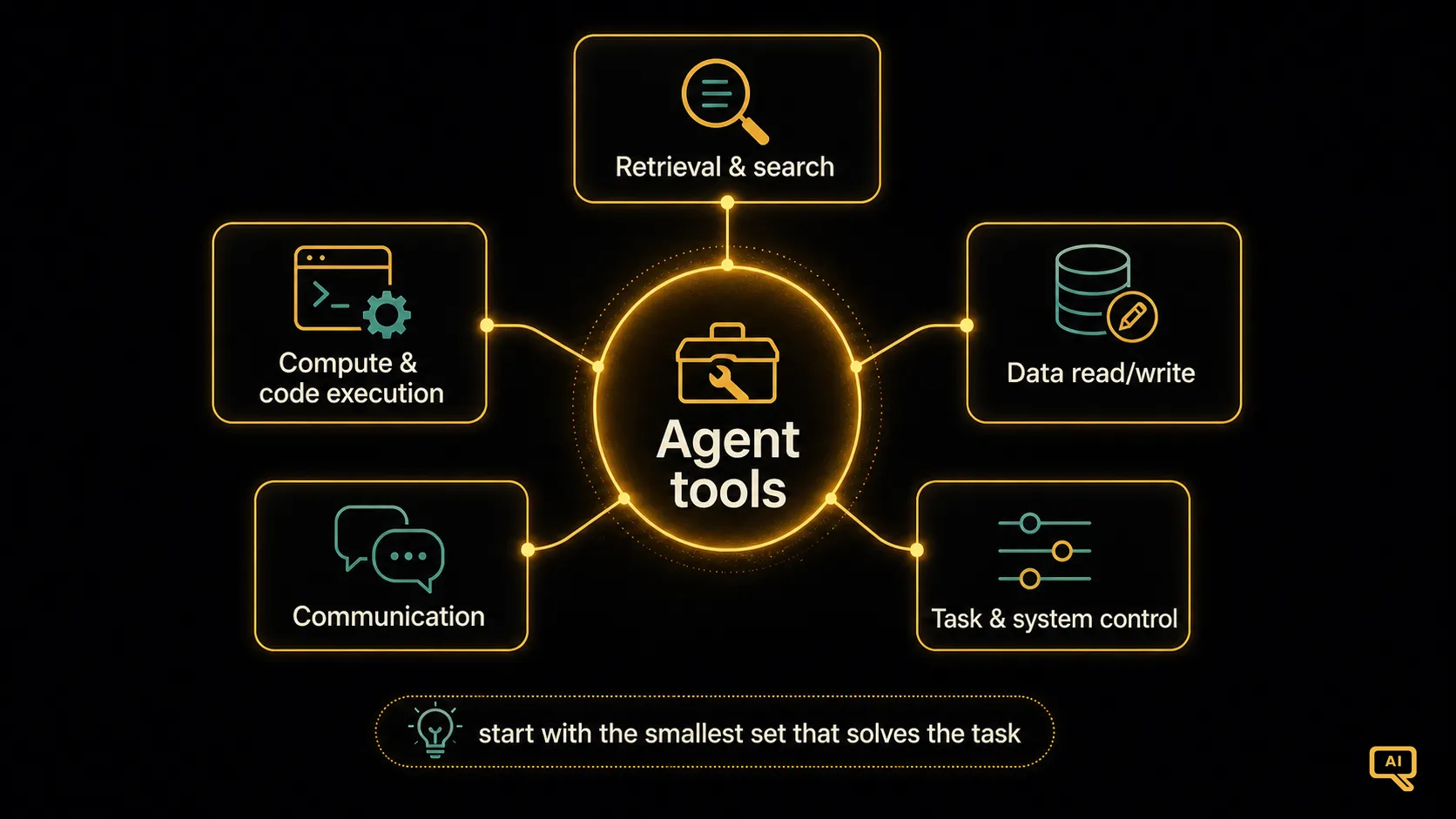 Figure 2: Real-world agents tend to draw from five tool categories. Retrieval and search for finding information. Compute and calculators for reliable math and code execution. Data reading and writing for interacting with your systems. Communication for sending messages. Task/system control for orchestration. Most agents mix tools from several of these.
- Retrieval and search. RAG-style lookups over your own documents, web search, database queries, knowledge-base access. Any way of pulling in information the model doesn’t already know.
- Compute and code execution. Calculators, code interpreters, custom functions. Anything where you want the definitive answer to something a language model would be shaky on (exact arithmetic, running a formula, executing a query).
- Data reading and writing. CRUD access to your business systems: reading a customer record, updating a status, appending to a log. This is where agents earn their keep by actually doing something in your production data.
- Communication. Sending emails, chat messages, notifications. Turning the agent’s conclusions into real-world action.
- Task and system control. Scheduling jobs, triggering workflows, calling other services. The glue that lets an agent coordinate work across your stack.
A useful design habit: start with the smallest set of tools the agent needs, and add more only when a real task requires it. Giving an agent 40 tools is a great way to make it worse at using any of them, because the model has to reason about which one to pick every single turn. Fewer, better-scoped tools almost always beat many, similar-looking ones.
Errors, retries, and being kind to yourself
Real tools fail. APIs go down. Data isn’t there. Arguments are wrong. If your tool wrapping code just crashes when this happens, the agent has no way to recover. So the practical pattern is to catch the error and return it to the model as a structured observation, so the loop can reason about what to do next:
def call_tool(name, arguments):
    try:
        return {"ok": True, "result": TOOL_TABLE[name](**arguments)}
    except Exception as e:
        return {"ok": False, "error": str(e), "hint": "check inputs or try a different tool"}
When the model sees {"ok": False, "error": "..."} come back, it can (and usually will) try to correct the issue. It might re-call with different arguments, use a different tool, or ask the user for clarification. This graceful-failure loop is a huge quality lift, and it costs you almost nothing to implement. Do it from day one.
The safety line: what agents should and shouldn’t be allowed to do
Because tool use is where an agent gains real-world power, it’s also where the safety concerns get real. The rule I’d tattoo on your wrist: never give an agent a tool with more permissions than it needs.
Some practical habits that keep this manageable:
- Scope tools tightly. Instead of a general “run any SQL query” tool, give the agent a
lookup_customer(id)tool that runs a specific, safe query. Instead of “send any email,” give itsend_support_reply(ticket_id, body)with the recipient locked to the ticket owner. - Read-only by default. Start with tools that observe, not tools that act. Add action tools deliberately, one at a time.
- Require confirmation for high-stakes actions. For anything with real consequences (money, deletion, external communication), the agent should propose the action, and a human should confirm it. This is a specific tool:
propose_email(...)that returns a draft, and a human approves. Notsend_email(...)firing autonomously. - Set spending and rate limits. If an agent can call an API that costs money or has rate limits, wrap the tool with a check. An agent that gets stuck in a loop and burns through your budget is a story every seasoned agent-builder has.
The security article at the end of this track goes deeper on this, including the prompt-injection risk that becomes serious once agents can take actions. For now, just internalise the principle: the tools you give an agent are the powers you give an agent. Choose them carefully.
The tool use mindset
If the agent loop from the last article is the skeleton of an agent, tools are the hands. And how you design those hands, what they can grasp, how you describe them to the model, what happens when they fumble, is what determines whether the agent works usefully or wastes your time. Almost every “our agent is unreliable” story I’ve heard has traced back to tools that were poorly scoped, poorly described, or poorly wrapped. This is where the real craftsmanship of building agents lives.
We now have the loop and the tools. The next thing an agent needs is a way to remember what’s happened, both within a task and across tasks. Because a lot of what makes an agent useful is being able to carry knowledge forward, and that’s a design challenge in its own right. Memory is next.
Next in the series: Memory in AI Agents, short-term and long-term memory, and how to design each well.